



Most plumbing shops treat every customer the same: same intake, same dispatch priority, same pricing logic, same follow-up. That feels fair, but it quietly causes plateaus (example: ~$800k–$1.2M revenue) where margins don't move even as call volume climbs. A portion of your book can be actively costing you money — consuming dispatch slots, creating disputes, demanding emergency response, and never converting to recurring work — while a smaller group funds the entire business.
Customer segmentation for plumbing isn't a marketing exercise — it's an operational decision system. Done correctly it tells your CSR and dispatcher which price sheet and priority to use, and it drives different operational tracks (pricing, SLA, follow-up) so you protect margin without arbitrary fairness.
Why "treat everyone the same" quietly kills your margins
Revenue can look fine while margins hide the problem. Shops grow by saying yes to everything: rental managers who negotiate invoices, one-off calls far outside your zone, or homeowners who only call in crises. Individually those look like revenue; in aggregate they drag repeat high-value work and routing efficiency — the two things that scale a plumbing business.
Example: Two customers with a $220 average ticket: - Customer A: homeowner in your core zone, books maintenance annually, upgrades on recommendations, refers neighbors, pays on the spot. - Customer B: landlord 35 minutes out, calls only for emergencies, disputes 1 in 3 invoices, demands same-day response. On paper they look similar per visit. In reality A might be worth $3k–$5k LTV with low friction while B nets almost nothing once drive time, admin, and dispute overhead are counted. Treating them identically subsidizes B with A's profit.
The four segments that matter
-
Core Recurring — Homeowners or light commercial in core zones who book planned work, respond to maintenance offers, and pay cleanly. Small in number, large in lifetime value.
-
Transactional Reactive — Solid one-off customers
call when something breaks, pay fairly, in a reasonable zone. Good business but not yet owned by you; the goal is to convert them upward.
-
High‑Maintenance / Low‑Margin — Price-shoppers, chronic disputers, out-of-zone one-offs, customers demanding emergency speed at standard pricing. Structurally unprofitable at current pricing/service model.
-
Strategic Commercial / Contract — Property managers, small facilities, builders. Higher ticket volume but only worth it if terms are structured; great when contractual, brutal when you let them dictate pricing.
Segments aren't permanent. Transactional Reactive customers can be moved to Core Recurring with follow-up. High‑Maintenance customers can be repriced until they either become profitable or self-select out. Segmentation is about running each segment through a different operational track, not labeling and abandoning customers.
Stop missing service calls and double bookings.
Plummerly helps you schedule, assign, and manage every plumbing job efficiently.
- Centralized job scheduling
- Technician dispatch & tracking
- Customer notifications
No credit card required
Mapping segments to pricing tiers
Once segments exist, assign each a pricing posture so your CSRs quote deliberately instead of by feel. If you don't have pricing governance already, this works best paired with a formal framework so prices don't drift.
| Segment | Pricing Posture | Diagnostic Fee | Discount Authority | Payment Terms |
|---|---|---|---|---|
| Core Recurring | Standard menu, loyalty perks | Waived on plan | Up to ~10% for CSR | On completion |
| Transactional Reactive | Standard menu, full | Standard | Manager only | On completion |
| High-Maintenance / Low-Margin | Standard +10–15%, no negotiation | Non-negotiable | None | Prepay or card on file |
| Strategic Commercial | Contract rate w/ minimums | Waived per contract | Per signed terms | Net 15, late fees enforced |
Pricing lets friction self-select. Price a chronic disputer +15% and require a card on file — the ones willing to pay become profitable, the rest leave and free slots for customers who actually fund your business. For Core Recurring, lean into perks and recurring plans with proper pricing bands and renewal automation so discounts lock in future revenue rather than just shaving a ticket. See: /blog/pricing-architecture-for-plumbing-a-governance-framework and /blog/build-plumbing-maintenance-plans-that-scale-pricing-bands-tech-scripts
Mapping segments to service levels and dispatch rules
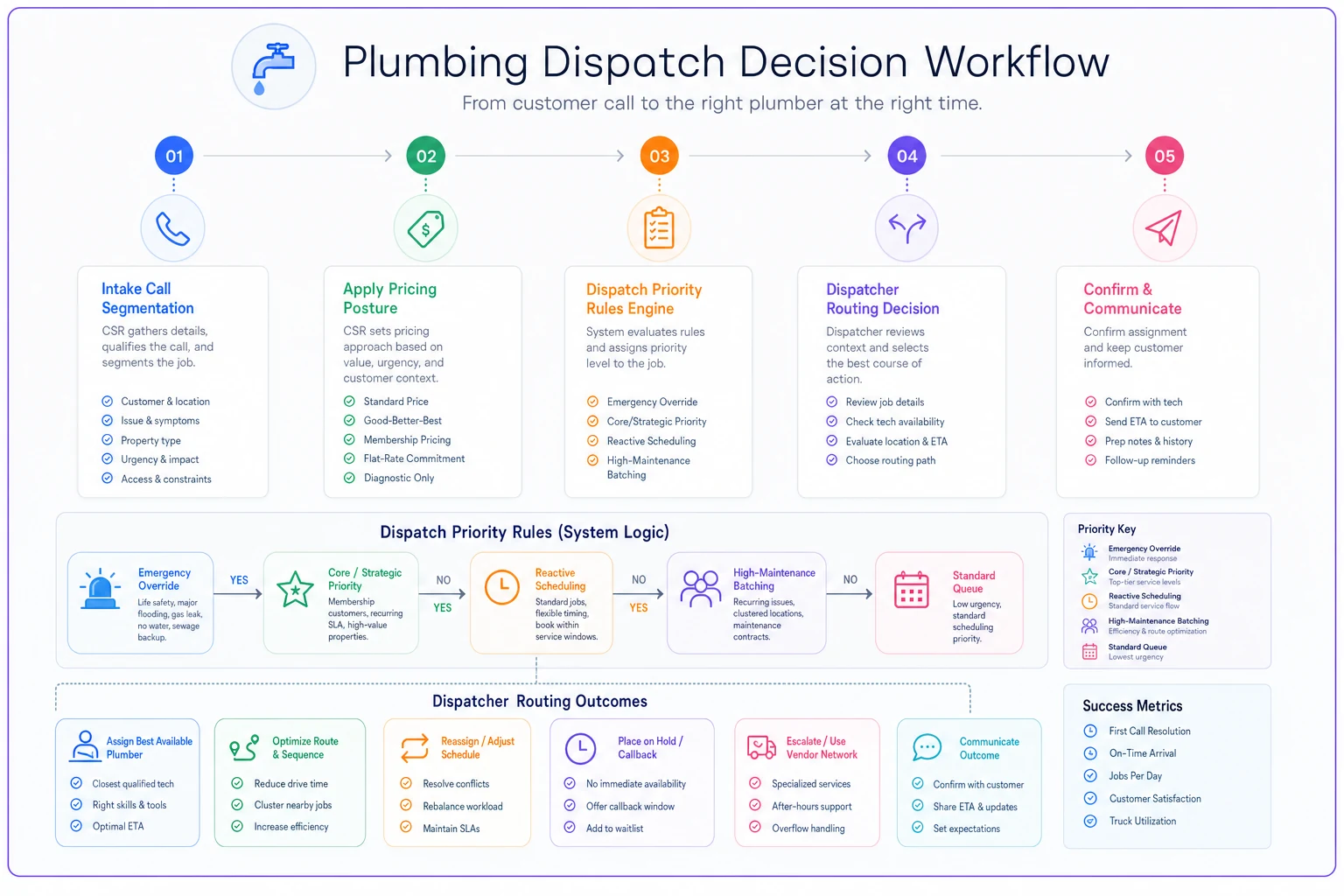
Pricing is half the system; the other half is speed and priority. Dispatch priority is a lever: Core Recurring and Strategic Commercial should get faster response than first-time out-of-zone price-shoppers. Your CSR must identify the segment during the call, and your dispatcher must have authority to enforce the schedule rules.
-
True emergency (health/safety, active flooding) → next available truck regardless of segment. Safety overrides everything.
-
Core Recurring or Strategic Commercial, urgent → same-day priority slot, bump ahead of non-urgent reactive work.
-
Transactional Reactive, urgent → same-day if capacity allows, otherwise next-day AM.
-
High‑Maintenance / Low‑Margin, non-emergency → scheduled into route-efficient windows only. No slot-jumping.
-
Out-of-zone anything → grouped and batched, never routed as a one-off unless premium-priced.
Dispatch priority and pricing must align. Charging a High‑Maintenance customer a premium but still letting them jump the queue teaches yelling works and undermines the premium. Rules must operate as a set.
Segment-level KPIs (so you actually know if this is working)
-
Average revenue per visit — is the premium on High‑Maintenance actually landing?
-
Repeat rate / annual visits — are Transactional customers coming back?
-
Conversion to plan/recurring — how many Reactive customers moved to Core this quarter?
-
Invoice dispute rate — truest signal of a bad-fit segment.
-
Drive time as % of billable hours — exposes out-of-zone drag.
-
Gross margin per segment — the number that ends the argument.
Watch trends: a shrinking High‑Maintenance headcount with stable margin means pricing walls are working. Conversion into Core Recurring is the key compounding number — moving even 15–20% of Reactives upward annually can change your trajectory.
A real scenario: sorting the book at a 3-truck shop
Example: a 3-truck residential shop doing ~$950k, owner on 60-hour weeks, margins in the low teens. After segmentation ~18% of customers (Core Recurring) produced a disproportionate share of profit, while ~25% (price-shoppers and out-of-zone one-offs) generated almost no net margin once drive time and admin were counted.
Actions: repriced High‑Maintenance with a modest premium + card-on-file, stopped slot-jumping for non-emergency low-margin calls, added a follow-up sequence for Reactive customers to nudge plan conversion. Result: within quarters a third of the High‑Maintenance segment stopped calling, freed slots went to Core/Reactive work, conversions rose, and gross margin moved from low teens to high teens with the same trucks and staff.
Small operational rules (pricing + queue enforcement) can unlock margin without adding trucks.
When this makes sense — and when it doesn't
When to do it: You're past solo-owner stage, running multiple trucks, and you see the busy-but-not-profitable symptom — inconsistent CSR quotes and triage-like dispatch. Segmentation is a scaling tool, not a startup tool.
When to hold off: one-truck operations still building reputation and cash flow should say yes to most work to grow. Applying strict tiers with open capacity just costs jobs.
Warning: don't be half-hearted. If you reprice or reprioritize a segment, commit across the team. Owner waivers undermine rules and train bad behavior. Either rules apply to everyone or they apply to no one.
How to enforce segmentation in your dispatch & CRM software
Short one-liners for intake prompts (copy-paste): - Core Recurring — planned customers in your core zone with a maintenance relationship or paid plan. - Transactional Reactive — one-off residential customers in-zone who pay at completion and have no plan. - High‑Maintenance / Low‑Margin — frequent disputers, out-of-zone one-offs, or customers with high service friction. - Strategic Commercial — property managers or contractors served under negotiated contracts.
| Segment | One-line definition |
|---|---|
| Core Recurring | Planned customers in core zone with a maintenance relationship or paid plan. |
| Transactional Reactive | One-off residential customers in-zone who pay at completion and have no plan. |
| High‑Maintenance / Low‑Margin | Frequent disputers, out-of-zone one-offs, or customers with high service friction. |
| Strategic Commercial | Property managers or contractors under negotiated contracts. |
Your software is the enforcement layer: intake forms must capture signals, rule engines must enforce pricing and SLA, dispatcher boards need filters and SLA timers, and dashboards must surface segment KPIs. If these elements aren't mapped into your CRM/dispatch product, enforcement becomes manual and fragile.
Customer record fields (persistent) — add these attributes so rules and dashboards can reference them:
| Field | Notes |
|---|---|
| segment_tag (ENUM) | Values: corerecurring, transactionalreactive, highmaintenance, strategiccommercial |
| plan_id (nullable) | Links to recurring plan |
| cardonfile_flag (boolean) | Tokenized card presence |
| avgdriveminutes (computed) | Last 12 months average |
| disputecount12mo (integer) | Disputes in last 12 months |
| lifetimevalueest (computed numeric) | LTV formula/assumptions surfaceable in UI |
| visitslast12mo (integer) | Activity signal |
| lastinvoicestatus | paid / disputed / unpaid / partial |
| commercial_flag (boolean) | Quick route to commercial intake |
| accountownerid | CSR or AM assigned |
Visit/job record fields (per-visit) — attributes needed for scheduling and rules:
| Field | Notes |
|---|---|
| scheduled_priority (ENUM) | emergency, sameday, nextday_am, batched, scheduled |
| urgency_flag (boolean) | Flag set during intake |
| routebatchid (nullable) | Grouping id for batched jobs |
| actualdriveminutes (numeric) | Captured after job |
| invoice_id (FK) | Link to invoicing |
| dispute_flag (boolean) | Set when customer disputes |
| requirecardon_file (boolean) | Set by rules |
| pricingmarkuppct (numeric) | Set by rules or manager |
-
Suggested CSR intake header
show segmenttag, planid, lifetimevalueest, cardonfileflag, disputecount_12mo at top of call screen.
-
CSR form
require triage fields (urgencyflag, commercialflag, addressdistanceindicator).
-
Dispatcher board/filter
filters for scheduledpriority, segmenttag, requirecardonfile, routebatch_id; color-code priority rows.
-
Mobile tech view
show segmenttag and scheduledpriority on job card; show plan job vs one-off and whether prepayment applied.
-
Admin panel
rule engine configuration, segment-level dashboards, and audit logs for overrides.
Rule engine / copy-paste rules (pseudocode)
Express platform-agnostic if/then rules. Replace field names to match your system.
-
Emergency override
If visit.urgencyflag = true AND visit.issuetype IN ('activeflood','gasleak','unsafe') THEN set visit.scheduledpriority = 'emergency' AND assign nextavailable_truck().
-
Same-day thresholds
If customer.segmenttag IN ('corerecurring','strategiccommercial') AND visit.urgencyflag = true THEN set scheduledpriority = 'sameday'. Else if customer.segmenttag = 'transactionalreactive' AND visit.urgencyflag = true AND dispatcher.remainingcapacitytodaypct >= 20 THEN set scheduledpriority = 'sameday' ELSE set scheduledpriority = 'nextday_am'.
-
High-maintenance blocking
If customer.disputecount12mo > 1 OR customer.avgdriveminutes > 40 THEN set customer.segmenttag = 'highmaintenance' AND set customer.requirecardonfile = true AND set visit.pricingmarkuppct = COALESCE(visit.pricingmarkup_pct, 12).
-
Out-of-zone batching
If job.distanceminutesoneway > 30 THEN set visit.scheduledpriority = 'batched' AND set visit.pricingmarkuppct = MAX(visit.pricingmarkuppct, 15) AND add to nextbatchfor_zone(job.zone).
-
Card-on-file enforcement
If customer.requirecardonfile = true AND customer.cardonfileflag = false THEN block scheduling of 'same_day' or 'emergency' slots and force 'prepay' payment option on booking.
-
Owner override/audit
If owneroverride = true THEN require overridereasontext AND log override in audit table with ownerid and trigger weekly audit email to operations manager.
Intake script & CSR form (copyable)
Required call fields (minimum) — make these form fields so tag happens during intake.
-
caller_name
-
service_address
-
phone
-
commercial_flag (Y/N)
-
urgency_flag (urgent / non-urgent / emergency)
-
plan_status (active / lapsed / none)
-
lastinvoicestatus (paid / disputed / unpaid)
-
unpaidinvoicescount (integer)
-
approximatetraveltime_minutes (system-calculated)
-
visibledamage / healthsafety_flag (Y/N)
60-second script lines (sample) — copyable for CSR training.
-
"Thanks — can I confirm the service address and best phone for updates?"
-
"Is anyone in danger right now or is there active flooding or a gas smell?" (if yes → emergency)
-
"Do you have a maintenance plan with us today?" (if yes → set plan_id; if no → continue)
-
"Roughly how far from [town center] is that location — it looks like about X minutes for us. We batch farther-out calls unless you choose premium priority."
-
"Have we worked for you in the last year?" (capture visitslast12mo)
-
"Any unpaid or disputed invoices with us in the last 12 months?" (if yes → set disputecount12mo)
-
"Do you have a card on file with us?" (if no and system requires it, capture payment)
CSR decision-tree checkboxes (edge cases) — surface these as warnings or required flows.
-
If commercial_flag = true → route to commercial intake flow and require contract reference.
-
If disputecount12mo > 1 → warn CSR
"High-maintenance profile — inform customer of prepayment/premium policy."
-
If avgdriveminutes > threshold → auto-flag as outofzone and present premium pricing option.
KPI formulas & SQL/pseudocode
Definitions and formulas — implement as computed fields where possible.
Average revenue per visit (segment): averagerevenuepervisit = SUM(visits.ticketrevenue WHERE customer.segmenttag = 'X') / COUNT(visits WHERE customer.segmenttag = 'X'). Visits per year (customer): visitsperyear = COUNT(visits WHERE visitdate >= now() - interval '12 months' AND visits.customerid = customer.id). Drive time as % of billable minutes (segment): drivetimepct = SUM(visits.actualdriveminutes WHERE segment) / SUM(visits.billableminutes WHERE segment) (billableminutes = onsiteminutes + laborminutes; include travel if you charge for it). Invoice dispute rate (segment): disputerate = SUM(CASE WHEN visits.disputeflag = true THEN 1 ELSE 0 END WHERE segment) / COUNT(visits WHERE segment). Gross margin per segment (per-visit): grossmarginpervisit = SUM(visits.ticketrevenue - visits.totalcost) / COUNT(visits) where totalcost = laborcostperminute*(onsiteminutes+driveminutes) + partscost + allocated_overhead.
Example SQL (Postgres-style pseudocode) to compute avgrevenuepervisit and disputerate by segment: SELECT c.segmenttag, COUNT(v.id) AS visits, SUM(v.ticketrevenue)::numeric / NULLIF(COUNT(v.id),0) AS avgrevenuepervisit, SUM(CASE WHEN v.disputeflag THEN 1 ELSE 0 END)::numeric / NULLIF(COUNT(v.id),0) AS disputerate, AVG(c.avgdriveminutes) AS avgdriveminutes FROM visits v JOIN customers c ON c.id = v.customerid WHERE v.visitdate >= now() - interval '12 months' GROUP BY c.segmenttag ORDER BY c.segment_tag;
Store derived metrics as computed fields on the customer record for fast CSR access.
Per-customer LTV formula & example calculator
LTV formula (implement as a computed field): LTV = (averageticket visitsperyear expectedyears grossmarginpct) - (annualadmincosts + expecteddrivecostsperyear expectedyears) Breakdowns (implement fields for each assumption so owners can tweak them): averageticket, visitsperyear, expectedyears, grossmarginpct, annualadmincosts, expecteddrivecostsper_year.
Example calculation (illustrative): - averageticket = $220 - visitsperyear = 1.2 - expectedyears = 5 - grossmarginpct = 0.35 - annualadmincosts = $30 - avgdriveminutes = 40 (round-trip) - costperdriveminute = $0.75 - expecteddrivecostsperyear = 40 0.75 1.2 = $36 Compute: LTV = ($220 1.2 5 0.35) - ($30 + ($365)) = $252 (example). Note: numbers are illustrative; surface assumptions and let owners tweak them. Label field "LTVest (example assumptions)".
Minimum product checklist for implementation
-
Rules-based dispatch / automation engine (if/then rules and scheduling actions).
-
Recurring-job module & billing for maintenance plans.
-
Card-on-file support (tokenized payment storage via PCI-compliant processor).
-
Route-optimization or basic route-batching integration.
-
Segment-level dashboards & computed fields on customer record.
-
API / webhooks for CRM / accounting / payment sync.
-
Mobile tech app showing priority/segment on job cards.
-
Audit logs and override tracking for enforcement.
-
Admin UI for threshold configuration (dispute_count thresholds, drive-time cutoffs).
Exportable configuration examples (admin checklist)
-
Add fields to customer schema
segmenttag, planid, cardonfileflag, disputecount12mo, avgdrive_minutes.
-
Add fields to visit/job schema
scheduledpriority, urgencyflag, requirecardonfile, pricingmarkup_pct.
-
Configure rule
"If disputecount12mo > 1 THEN set segmenttag = highmaintenance; requirecardonfile = true; pricingmarkup_pct = 12."
-
Configure SLA timers
set cutoff for 'same_day' jobs (e.g., 3:00 PM local time).
-
Create dispatcher filter views
by scheduledpriority, by segmenttag, by routebatchid.
-
Create CSR intake screen
surface customer.segmenttag, LTVest, cardonfileflag, disputecount_12mo at top.
-
Build batch job process
weekly batch assignment for scheduled_priority = 'batched' grouped by zone.
-
Create audit report
weekly list of owner_override entries with reasons.
Pilot & measurement plan (8–12 week template)
Run a pilot before changing the entire book. Select 1–3 trucks or 2–3 adjacent zip codes with mixed segments. Exclude emergency-only days and holidays.
-
Timeline
2 weeks baseline → 8–12 weeks pilot with rules enforced → 2 weeks stabilization + analysis.
-
Primary metrics
gross margin per visit, average drive_minutes per visit, conversion to plan (Reactive → Core) over 90 days, dispute rate.
-
Secondary metrics
technician utilization, customer satisfaction (CSAT), number of owner overrides.
-
Minimum sample size
aim for 30–50 visits per test group for operational signals; more needed for revenue confidence.
-
Success thresholds (examples)
gross margin per visit +3–5 percentage points OR drive minutes per visit -10% OR conversion to plan +≥10% in pilot area.
-
Rollback criteria
customer complaints > baseline by 25%, gross margin drops >3 percentage points for 2 consecutive weeks, owner overrides exceed threshold.
Rollout & change-management guidance
-
CSR/dispatcher training
60-minute session on intake flow and new fields; role-play triage; walkthrough of override process; quick reference cheat sheet.
-
Enforcement audits
weekly owner_override counts; weekly list of customers with >1 dispute in 12 months; monthly segment margin report.
-
Owner escalation rules
Level 1 CSR → dispatcher within shift; Level 2 recurring issues → operations manager within 24 hours; Level 3 pricing exceptions → owner sign-off with audit log.
-
Communications templates
short pre-notify SMS/email about priority/pricing changes and CSR script for pricing change that highlights benefits and options.
Troubleshooting: common failure modes and corrective actions
-
Owner overrides everything — Fix
enforce override logging, cap weekly owner overrides, require written justification and secondary sign-off above threshold.
-
Inconsistent CSR tagging — Fix
make key fields required on intake, add inline helper text, monitor missing-tag rate and retrain.
-
Dispatcher bypasses rules — Fix
daily exceptions report and require dispatcher to log reason; automate exception quotas.
-
Payment tokenization failures — Fix
verify processor integration, add fallbacks (manual capture), and notify ops when tokenization error rates exceed X%.
-
Rules cause local PR issues — Fix
roll back for affected area, refine messaging, and introduce changes gradually with support team handling questions.
Assets, mockups & implementation kit
-
dispatch-decision-flowchart.pdf — one-page decision tree for dispatchers
-
segment-cards-infographic.png — four segment cards for quick reference
-
intake-screen-wireframe.svg — annotated CRM intake wireframe showing where to surface segment/LTV/card-on-file
-
segment-kpi-dashboard.png — sample segment-level KPIs for weekly reports
-
route-before-after-map.png — optional route-efficiency visual for internal presentation
Export links / further reading & compliance notes
-
/blog/pricing-architecture-for-plumbing-a-governance-framework
-
/blog/build-plumbing-maintenance-plans-that-scale-pricing-bands-tech-scripts
-
/blog/customer-lifecycle-system-for-plumbing-businesses-handoffs-automation
-
/blog/plumbing-operations-playbook-template-copyable-sops-for-dispatch
-
/blog/zone-based-route-clustering-to-cut-technician-drive-time-for-small
-
/blog/microbuffer-rules-for-very-small-fleets-daily-weekly-emergency-float
-
/blog/emergency-call-triage-for-plumbers-60second-intake-scripts-response
-
/blog/plumbing-kpis-that-drive-decisions-executive-ops-technician-metrics
-
/blog/fieldtooffice-invoicing-workflow-for-plumbers-to-cut-a-r-days-mobile
-
/blog/job-costing-template-for-singlevisit-residential-plumbing-example
-
/blog/avoid-integration-fragmentation-a-maturitybased-api-vendor-contract
Compliance notes (not legal advice): Card-on-file and precharge behaviors are governed by PCI rules and local consumer protection laws. Verify tokenization and workflows with your payment processor and legal counsel before changing payment or precharge policies. Local jurisdictions may restrict convenience fees or mandatory prepayments.
Segmentation only works when pricing, service level, and dispatch all point in the same direction. Charge the premium and enforce the queue. Give the perks and the priority. Reward the customers who fund your business and let pricing gently sort out the ones who don't.
Start small: implement the fields above, enable one or two rules, run an 8–12 week pilot, measure segment KPIs, and expand in waves. Shops that break past their plateau aren't taking more calls — they're taking the right calls.
Ready to optimize your plumbing operations?
Join 500+ plumbing businesses using Plummerly to save time, reduce scheduling errors, and improve customer satisfaction.