


Most plumbing owners don't have a software problem. They have a category confusion problem. They see FieldEdge, Housecall Pro, Jobber, ServiceTitan, QuickBooks, some routing app, and a couple of payment processors all thrown into the same conversation, and they can't tell which of these things overlap, which are mandatory, and which they're already paying for twice.
First, Understand the Four Jobs Your Software Has to Do
So instead of picking the right software for plumbing businesses with 1–10 trucks, they either:
-
Buy one giant platform built for 40-truck operations and use maybe 20% of it, or
-
Stitch together four cheap apps that don't talk to each other, and quietly lose an hour a day copying data between them
This guide breaks down the actual categories of software you should be evaluating, what each one does, honest pros and cons, real price bands, the integrations that matter, and — the part most guides skip — a set of decision rules based on your truck count and where you're trying to be in 18 months.
Before you look at a single vendor, get clear on the four operational jobs any plumbing stack has to cover. Almost every product on the market is really just one, two, or three of these bundled together and marketed as "all-in-one."
-
Scheduling & dispatch — who goes where, when, and in what order
-
Customer management (CRM) — history, addresses, equipment, communication, follow-ups
-
Job execution — quotes, work orders, photos, parts, tech mobile app, sign-offs
-
Billing & money — invoicing, payments, and the handoff to accounting
The thing people miss: "all-in-one" field service platforms cover jobs 1–4 reasonably but rarely cover any single one of them deeply. A dedicated routing tool will crush the dispatch job. A dedicated CRM will crush customer nurture. The all-in-one gets you 80% on all four, which for a 1–6 truck shop is usually the right trade.
The mistake is assuming you need best-in-class in all four categories at three trucks. You don't. You need "good enough and connected."
The Software Categories, One by One
Below is an honest breakdown of each category you'll be choosing between. Read the cons more carefully than the pros — the cons are what actually cost you money later.
Stop missing service calls and double bookings.
Plummerly helps you schedule, assign, and manage every plumbing job efficiently.
- Centralized job scheduling
- Technician dispatch & tracking
- Customer notifications
No credit card required
Category 1: All-in-One Field Service Management (FSM)
This is the core of most plumbing stacks. Think Housecall Pro, Jobber, FieldPulse, ServiceFusion, FieldEdge, Commusoft, and (at the larger end) ServiceTitan. These bundle scheduling, dispatch, a tech mobile app, quoting, invoicing, and basic CRM into one login.
Pros
-
One source of truth for jobs and customers
-
Tech mobile app included — no separate purchase
-
Usually has native QuickBooks/Xero sync
-
Payments are built in, so field-to-invoice is fast
Cons
-
Routing is usually basic (fine for 1–5 trucks, noticeably weak past that)
-
Reporting depth varies wildly between vendors
-
The cheap tiers strip out features you'll want by truck #4 — inventory, advanced dispatch board, etc.
-
Migrating off one later is genuinely painful
Typical price bands
| Vendor tier | Rough monthly cost | Pricing model |
|---|---|---|
| Entry (solo / 1 truck) | ~$50–$100 | Flat or per-user |
| Small team (2–5 trucks) | ~$150–$400 | Per-user, sometimes tiered flat |
| Growth (5–10 trucks) | ~$400–$900 | Per-user + add-ons |
| Enterprise-leaning (ServiceTitan-class) | $1,000+, often quoted | Custom, per-tech + implementation fees |
The per-tech pricing sneaks up on you. A platform at $89/tech/month feels cheap at two trucks ($178) and stings at eight ($712) — before add-ons.
Category 2: Dedicated Scheduling & Dispatch Boards
Some shops layer a stronger dispatch tool on top of, or instead of, the FSM's built-in board. This matters most when you're juggling emergency calls against booked maintenance and need a visual, drag-and-drop board that updates the field in real time.
Pros
-
Better handling of same-day reshuffles and emergencies
-
Cleaner visual load balancing across techs
Cons
-
Another system to sync
-
Overkill for small fleets
-
You lose the single-source-of-truth advantage if it's not tightly integrated
If you're constantly firefighting same-day chaos, the fix is often process before software — tighter intake and triage rules. We covered some of that thinking in the June jobs slowdown operations guide, where scheduling discipline mattered more than any tool.
Category 3: Route Optimization / Mapping
This is the category most 1–10 truck shops underuse. Drive time is pure margin leak. A tech doing 90 minutes of avoidable driving a day is roughly 7+ lost hours a week — call it a partial extra job you're never billing.
Pros
-
Genuinely cuts fuel and windshield time
-
Tighter arrival windows mean happier customers
-
Pays for itself faster than almost any other tool category
Cons
-
If it doesn't sync back to dispatch, you're re-keying stops
-
Optimization is only as good as your address and data hygiene
Price band: roughly $10–$40 per driver/month for dedicated routing tools; often "included but basic" inside FSMs.
Decision rule: if your techs are averaging more than 60–75 minutes of daily drive time across a wide metro, a real routing layer is worth it even at three trucks.
Category 4: Customer Management / CRM & Follow-Up
Every FSM has a customer record. Few do nurture well — review requests, maintenance plan renewals, reactivation of dormant customers, membership tracking.
Pros
-
Automated review requests and follow-ups
-
Membership and maintenance plan lifecycle tracking
-
Better segmentation of high-value customers
Cons
-
Overlaps heavily with FSM — easy to pay twice for the same functionality
-
Data sync between CRM and FSM is a common failure point
Category 5: Accounting & Payments
Not optional, and not a place to get clever trying to save money. QuickBooks Online is the default for a reason — nearly every FSM syncs to it. Payments are usually processed through the FSM so field-collected cards flow straight to the invoice.
One rule worth keeping: never let your FSM be your only record of financials. Accounting lives in the accounting system. The FSM feeds it. Keep that direction of flow clean or reconciliation becomes a monthly headache.
Price band: QuickBooks Online runs roughly $35–$100/month depending on tier. Payment processing sits around 2.6–3.5% per card transaction — that rate is more negotiable than vendors let on.
The Integrations That Actually Matter (and the Ones That Don't)
Integration fragmentation is where small shops quietly bleed hours. Here's a priority order that holds up in real operations:
Must-have integrations:
-
FSM → Accounting (QuickBooks/Xero). Non-negotiable.
-
FSM → Payments. Field card capture must land on the invoice automatically.
Strongly recommended:
-
FSM → Mapping/routing (even the basic built-in kind)
-
FSM → SMS/email for customer notifications
Nice-to-have:
-
CRM → FSM two-way sync (only if you run a dedicated CRM)
-
Inventory/parts vendor feeds
The pattern to avoid: an integration that's one-way when you assumed it was two-way. Owners discover this the hard way when a payment marked in the field never shows in accounting, and now A/R is fiction. Test every sync in both directions during your trial. Actually create a fake job, invoice it, pay it, and watch it appear in QuickBooks. Don't trust the feature checkbox.
Test every sync in both directions during your trial.
Where AI-assisted operational platforms add real value here is quieter than the marketing suggests. The useful version isn't a robot dispatcher — it's automation that flags when a synced record didn't match, drafts the follow-up text after a completed job, or pre-sequences tomorrow's stops so your dispatcher isn't rebuilding the board from scratch each morning. It removes the repetitive re-keying that eats an admin's afternoon, not the judgment calls.
Decision Rules by Fleet Size
Match yourself honestly.
1–2 trucks (owner still turns wrenches)
-
One flat-rate or entry-tier all-in-one FSM covers everything you need — scheduling, CRM, payments. Don't add anything else. QuickBooks Online sync is enough on the accounting side.
-
Budget
roughly $100–$250/month total
-
Don't buy a dedicated dispatch board or CRM. You'll never open it.
3–5 trucks (you've hired a dispatcher or office person)
-
Mid-tier all-in-one FSM with a real dispatch board and inventory. Add a routing layer if drive time is high. QuickBooks with integrated payments, tested both directions.
-
Budget
roughly $300–$600/month
-
This is where automating review requests and renewal reminders starts paying off
6–10 trucks (dispatch is a full-time role, growth is the plan)
-
Growth-tier FSM with strong reporting and dispatch. Take route optimization seriously — either strong native or a dedicated tool. Consider a dedicated CRM only if memberships are a real revenue line.
-
Budget
roughly $600–$1,200+/month
-
Start scrutinizing per-tech pricing hard here. It's your fastest-growing software line item.
Start scrutinizing per-tech pricing hard here. It's your fastest-growing software line item.
When Each Choice Is Actually a Bad Idea
Buying enterprise-class software (ServiceTitan-tier) under 6 trucks: almost always a mistake. The implementation fees and per-tech costs assume a scale you don't have yet. You'll use a fraction of it and resent the bill every month.
Stitching four cheap tools together to save money: the savings evaporate the moment your office person is spending an hour a day moving data between them. Re-keying is invisible cost — it doesn't show on an invoice, so owners ignore it until they can't.
Adding a dedicated CRM at two trucks: you don't have the customer volume or process maturity to feed it properly. It becomes a graveyard of half-entered contacts.
Skipping accounting integration to "just export CSVs monthly": works until it doesn't, and it stops working right around the time you're too busy to fix it.
A Real Scenario: 4-Truck Residential Shop
A residential service shop running four trucks was on a bargain FSM at the entry tier, plus a separate booking widget and manual QuickBooks entry. The office manager was spending close to an hour every morning rebuilding the day's schedule, and another stretch each afternoon typing invoices into QuickBooks by hand.
The measurable problems: invoices were going out 3–4 days after job completion (A/R was creeping past 40 days), and drive time was untracked but clearly high — techs were crisscrossing the metro.
They consolidated onto a single mid-tier all-in-one with native QuickBooks sync, integrated payments, and turned on the built-in routing. Nothing exotic. Roughly a quarter later: invoices went out same-day or next-day for most jobs, A/R came down into the high-20s-day range, and the morning schedule rebuild dropped from close to an hour to maybe 15 minutes because the board carried over and routing pre-sequenced stops.
Monthly software cost went up by around $150 — and that was easily covered by the recovered admin hours and faster cash collection. Not a dramatic revenue transformation. Just less leakage.
Vendor Evaluation Criteria (Use This When Comparing Products)
When you're in demos, salespeople steer you toward features. Steer yourself back to these:
-
Two-way accounting sync — test it live, both directions
-
Real per-tech cost at your projected 18-month headcount, not today's
-
Migration/exit terms — can you export your full data if you leave?
-
Dispatch board usability — have your actual dispatcher click through it
-
Mobile app reliability in dead zones — does it queue offline?
-
Payment processing rate — and whether it's negotiable
-
Implementation fees and timeline — get them in writing
-
Support responsiveness — email them a question before you buy and time the reply
Steer yourself back to these priorities during demos and test the items above rather than feature checklists.
Implementation Checklist
Once you've picked, don't wing the rollout. This order keeps you from data disasters.
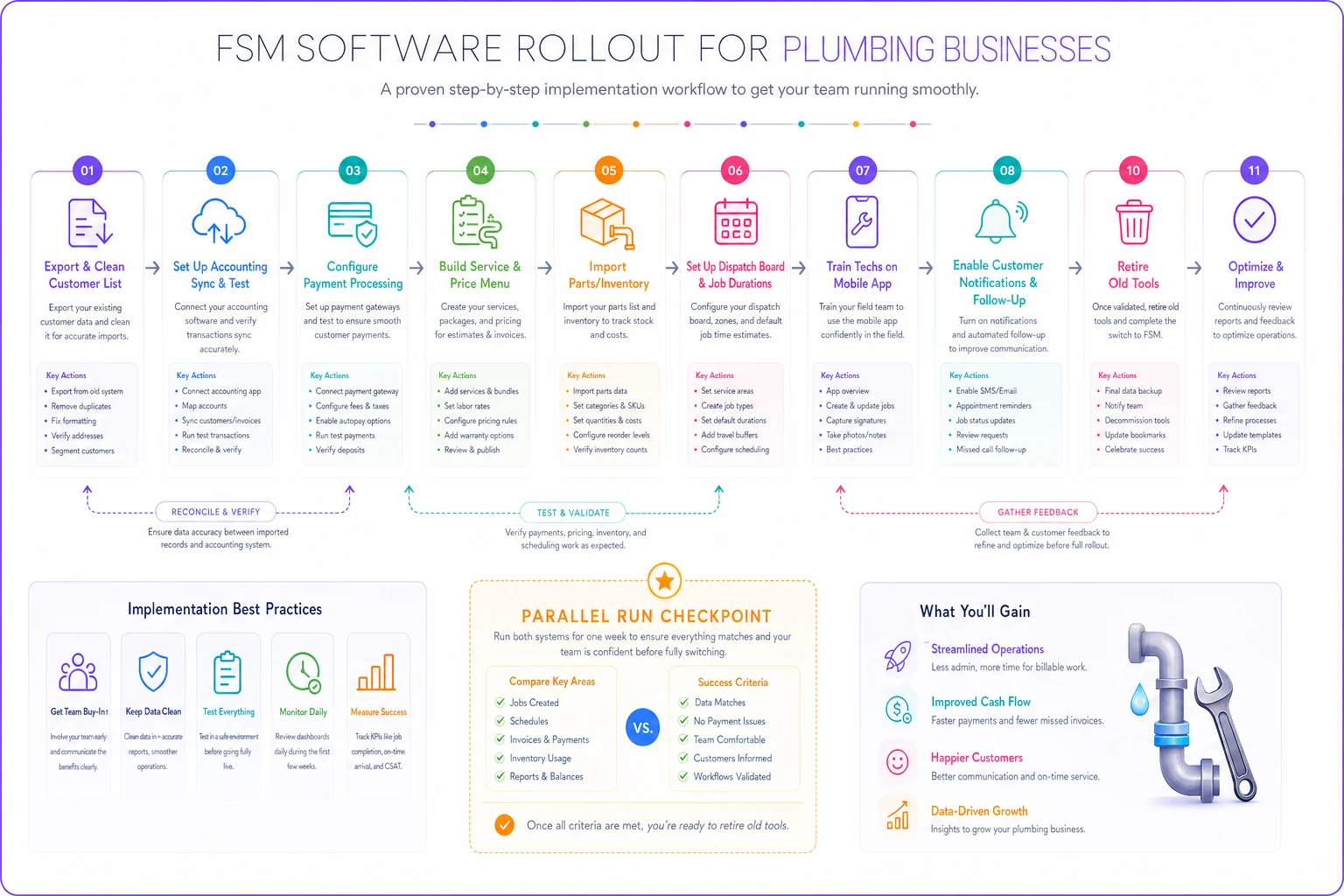
Here's a quick visual of the rollout sequence.
-
Export and clean your customer list before importing anything (dedupe addresses)
-
Set up accounting sync first, and reconcile one test job end-to-end
-
Configure payment processing and run a $1 live test transaction
-
Build your service and price menu into the quoting module
-
Import parts/inventory if your tier supports it
-
Set up the dispatch board and default job durations
-
Train techs on the mobile app in the field, not in a conference room
-
Turn on customer notifications and one automated follow-up (review request)
-
Run parallel for one week — old system and new — before cutting over
-
Kill the old tools completely once reconciliation matches for a full week
The parallel-run week is the step everyone wants to skip. Don't. It's the difference between a smooth cutover and a month of "wait, where's that invoice?"
Where to Land
For most plumbing businesses with 1–10 trucks, the right answer is a single well-chosen all-in-one FSM with clean accounting and payment integrations — plus a routing layer if your drive time is bleeding hours. You add dedicated dispatch or CRM tools only when a specific pain gets loud enough to justify the extra sync headache.
The owners who get this wrong overspend on capability they can't use yet. The ones who get it right buy for the truck count they'll have in 18 months, keep the integrations tight and tested, and let the software quietly remove the re-keying and follow-up work that never should've been manual in the first place.
Match the category to your fleet size, test your syncs before you trust them, and don't buy the 40-truck platform to run four trucks.
Ready to optimize your plumbing operations?
Join 500+ plumbing businesses using Plummerly to save time, reduce scheduling errors, and improve customer satisfaction.