

Most plumbing owners don't shop for software with a clear category map in their head. They Google "best plumbing software," land on a shortlist of five vendors, book two demos, and make a $200/month commitment based on which salesperson was less annoying. That's not a buying process — that's a reaction.
The problem is that field service software for plumbers isn't one thing. It's at least four or five different software categories that sometimes come bundled into one platform and sometimes don't. If you don't know which categories you actually need — and which ones you can skip at your current size — you either overpay for features you'll never touch or underbuy and outgrow the thing in eight months.
This guide maps the categories, not the brands. Once you understand the categories, the brand decision gets a lot easier.
## The Four Core Categories (and Two You'll Eventually Care About)
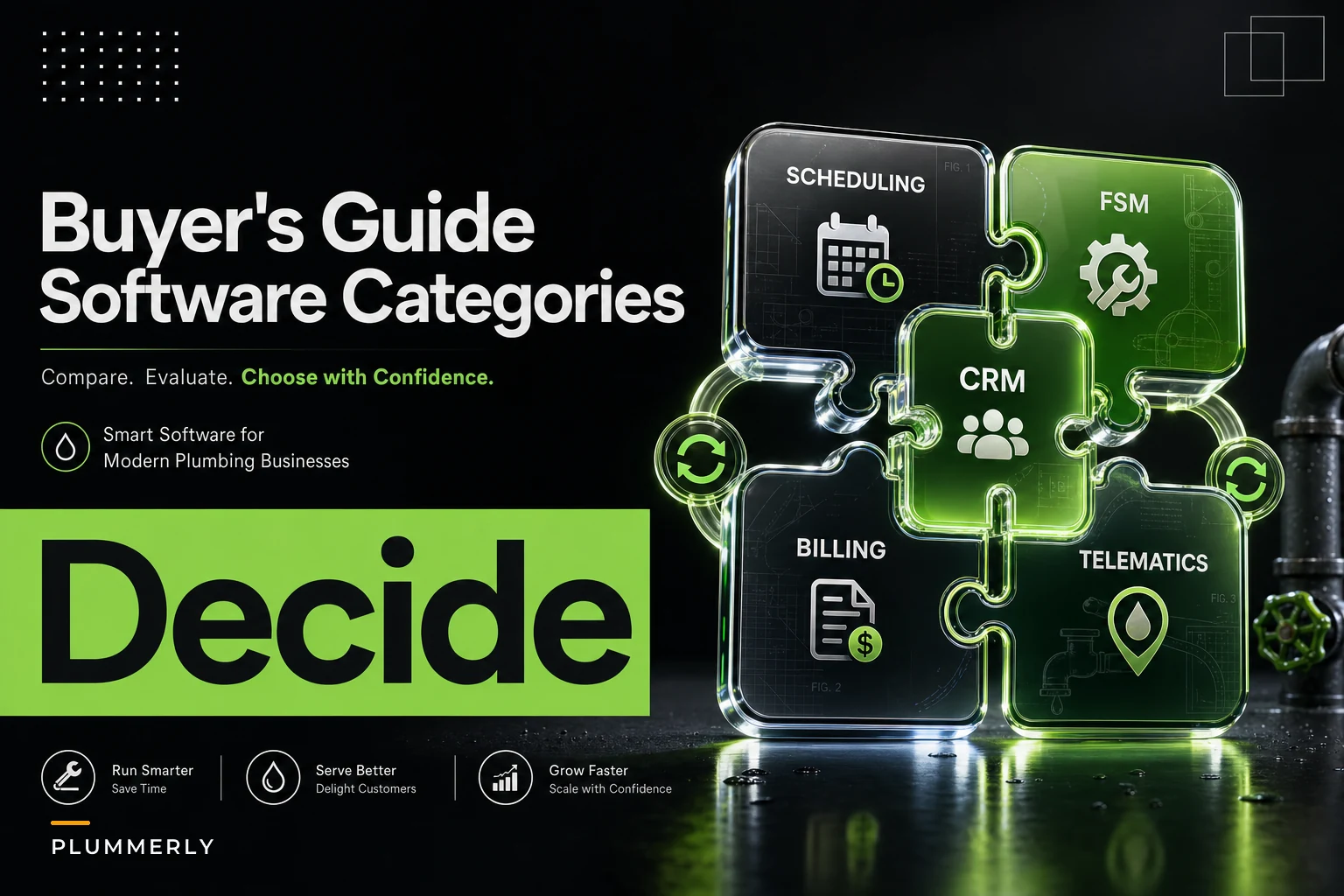
Before you look at a single pricing page, get clear on what buckets exist. Here's how the functions actually break down in real plumbing operations:
| Category | Core job it does | Who feels the pain without it |
|---|---|---|
| Scheduling & Dispatch | Assigns jobs to techs, manages the calendar, handles reschedules | Dispatcher / owner |
| CRM / Customer Management | Stores customer history, properties, past jobs, communication | Office + sales |
| Billing & Invoicing | Quotes, invoices, payment collection, A/R tracking | Bookkeeper / owner |
| Mobile Field App | Tech-facing tool for job details, photos, parts, sign-off | Technicians |
| Route Optimization | Sequences stops to cut drive time | Dispatcher (bigger fleets) |
| Telematics / GPS | Tracks vehicles, verifies arrival times, fuel use | Fleet manager (4+ trucks) |
The first four are non-negotiable even for a solo operator. The last two become relevant once you're running enough trucks that drive time and vehicle costs start eating into margin.
One thing most buyers miss: these categories are not equally mature inside every "all-in-one" platform. A vendor might have excellent dispatch and an invoicing module that feels like it was built in 2011. The marketing page says "all-in-one." What you're actually buying is one strong category and three mediocre ones. More on how to catch that during demos later.
## Category 1: Scheduling & Dispatch
This is the heart of the system. If dispatch is clunky, nothing else matters — your entire day runs through it.
Stop missing service calls and double bookings.
Plummerly helps you schedule, assign, and manage every plumbing job efficiently.
- Centralized job scheduling
- Technician dispatch & tracking
- Customer notifications
No credit card required
Core capabilities to look for:
-
Drag-and-drop calendar with tech columns
-
Job status tracking (scheduled → en route → onsite → complete)
-
Automated customer notifications on arrival windows
-
Capacity visibility (who's free, who's slammed)
-
Easy reschedule without re-entering the whole job
When this works well, your dispatcher stops playing phone tag. A solid drag-and-drop board lets one person manage six to eight techs without losing their mind. The more powerful dispatch tools, though, assume you have a dedicated dispatcher. Solo operators and 2-truck shops often find enterprise-style dispatch boards overbuilt and confusing — there's a real tendency for vendors to demo the premium tier even when a simpler setup would serve you better.
Typical pricing: Usually bundled into the base platform, but dispatch-heavy tiers run roughly $50–$120 per user/month. Some vendors charge per "office user" plus a lower rate for field techs.
The common failure isn't the software — it's buying dispatch sophistication you don't have the volume to use. A 3-truck shop doesn't need AI-driven capacity forecasting. It needs a clean board and reliable text notifications. If your slow seasons already create scheduling gaps — a pattern worth planning around, covered in our breakdown of immediate operations moves during a jobs slowdown — the fancier forecasting features just sit idle anyway.
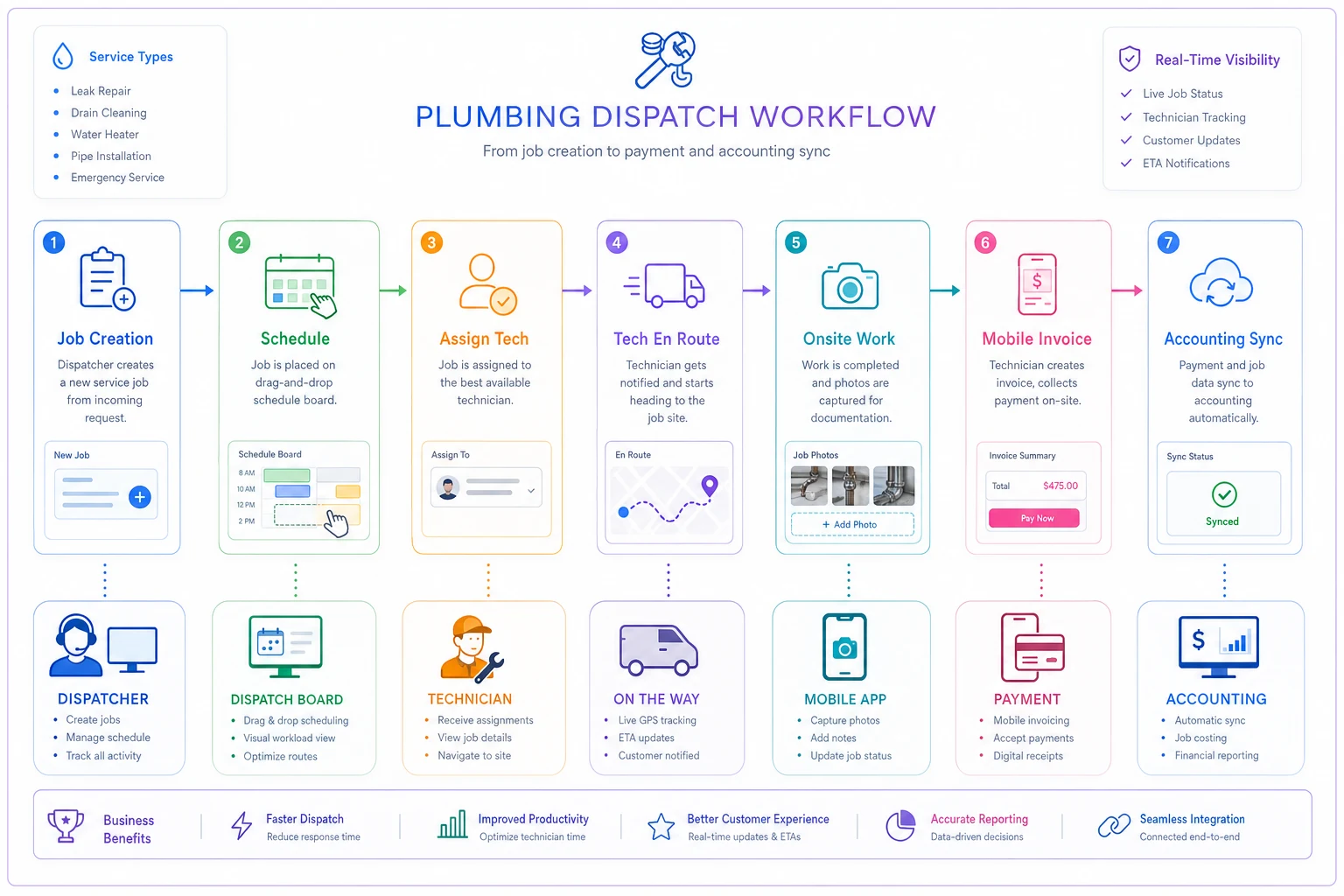
This illustrates a typical dispatch workflow from job creation to tech completion.
## Category 2: CRM / Customer Management
Plumbers underestimate this one constantly. They think of CRM as a "sales thing" and assume a residential service business doesn't need it. Wrong frame entirely.
For plumbing, CRM is really property and history management. Every repeat customer is a house with a known water heater age, a known shutoff valve location, and a history of what you've already fixed.
Core capabilities:
-
Full job history per customer and per property
-
Multiple properties under one customer (landlords, property managers)
-
Communication log (calls, texts, emails in one place)
-
Service reminders and maintenance plan tracking
-
Equipment/asset records tied to the address
When a repeat call comes in, the office can pull up the record and see that the water heater was flagged at eleven years old on the last visit — before the tech even rolls. That's where upsell revenue actually lives. The downside is that weak CRM modules inside field service platforms often can't handle one customer with multiple properties cleanly. If you do any property-manager or landlord work at all, test this specific scenario during the demo.
Typical pricing: Almost always bundled. Rarely a standalone line item for small fleets.
The mistake that keeps repeating itself: shops migrate their customer list as a flat spreadsheet — name, phone, address — and lose all the equipment and job history in the process. Six months later the CRM is just a contact list, not an operational asset. If you're going to bother with a CRM, the migration has to carry the history, not just the contacts.
## Category 3: Billing & Invoicing
This is where the money actually comes in, and it's the category where "all-in-one" platforms most often fall short.
Core capabilities:
-
Quote/estimate creation with your price book
-
Mobile invoicing (tech closes out onsite)
-
Integrated card/ACH payments
-
A/R aging and follow-up
-
Clean two-way sync with your accounting software
Collecting payment in the driveway instead of mailing an invoice is probably the single biggest cash-flow improvement a small shop can make. Field-closed invoices get paid days faster — sometimes a week faster. Where things break is the accounting sync. A lot of platforms "integrate with QuickBooks" in the sense that they push a daily summary, not a clean line-item sync. That difference will make your bookkeeper's life miserable.
Typical pricing: Bundled in the platform, but payment processing is separate — usually 2.6%–2.9% + $0.30 per card transaction, sometimes lower for ACH. Watch for platforms that mark up processing above standard rates.
Before you buy: create a sample invoice with parts, labor, a discount, and tax. Push it to your accounting system. Look at how it lands on the other side. If parts and labor collapse into one line, or tax maps to the wrong account, that's what your bookkeeper will be cleaning up every single day. This is exactly the kind of workflow detail that separates software that reduces office work from software that quietly doubles it.
## Category 4: The Mobile Field App
Your techs live in this. If they hate it, adoption dies, and you end up paying for software nobody fully uses — which is honestly the most expensive outcome there is.
Core capabilities:
-
Works offline (basements and crawlspaces kill signal)
-
Photo capture tied to the job
-
Parts/material entry from the field
-
Customer signature and completion sign-off
-
Clear job details and directions
A good field app eliminates the "what did you do on that job?" phone call at 5pm. Everything's documented at the source. Heavier platforms sometimes treat the field app as an afterthought, though. If the app is slow to load or requires a dozen taps to add a part, techs route around it — paper notes, texts to the office, the whole thing unravels.
The real test: hand the app to your least tech-friendly tech during the trial period. Not your sharpest one. If your veteran who still prefers paper can close a job without calling the office twice, you've probably found the right tool.
## Categories 5 & 6: Route Optimization and Telematics
These two stay optional until your fleet hits a size where they actually pay for themselves.
Route optimization sequences stops to minimize drive time. For a 1–2 truck operation covering a tight service area, this is overkill — your tech already knows the neighborhoods. It starts mattering around 4+ trucks or when your service radius gets wide enough that routing decisions have a real cost.
Telematics/GPS verifies where trucks actually are, confirms arrival times against customer notifications, and flags fuel waste and excessive idling. Below 3 trucks, you can manage this manually. Above that, it becomes genuinely useful for accountability and sometimes insurance purposes.
Typical pricing: Route optimization is often a premium add-on, roughly $10–$30 per vehicle/month. Telematics hardware runs $20–$40 per vehicle/month including the device.
Buying telematics for a 2-truck shop because a sales rep framed it as "professional" is a bad idea. You'll pay monthly for data you glance at twice and then ignore. Put that money toward better dispatch tooling instead.
## Required Integrations: The Part Everyone Underestimates
The software doesn't live in isolation. These connections determine whether your stack actually functions as a system:
-
Accounting (QuickBooks Online/Desktop, Xero) — the single most important integration. Test line-item sync, not summary sync.
-
Payments (built-in processor vs. bring-your-own) — check the rate and whether you're locked in.
-
Mapping / route optimization — native vs. third-party add-on changes the price.
-
Telematics — some platforms integrate GPS data directly into dispatch; most don't.
Integration gaps don't show up in demos. They show up in month two, when you realize the payment sync creates duplicate entries or the mapping doesn't account for your actual service zones. Ask the vendor for a reference customer your size who uses the same accounting setup you do — not just a generic reference.
## Expected Implementation Time by Scope
Set realistic expectations before you start. Here's roughly what rollout looks like depending on your fleet size:
-
Solo / 1 truck 1–2 weeks. Mostly data entry and learning the calendar.
-
2–4 trucks 3–5 weeks. Customer migration, price book setup, tech training.
-
5–10 trucks 6–10 weeks. Add role permissions, dispatch workflows, accounting reconciliation, and a parallel-run period where you keep the old system live while you shake out problems.
The biggest time sink is almost always the price book and customer history migration, not the software configuration itself. Shops that budget two days for migration and then discover their records are a mess end up spending three weeks instead. Budget accordingly.
## Decision Matrix: What to Buy by Size and Growth Plan
The underlying logic: buy for the fleet you'll have in 12 months, not 36.
| Your situation | Prioritize | Skip for now |
|---|---|---|
| Solo, stable | Mobile invoicing + basic scheduling + payments | Dispatch boards, route optimization, telematics |
| 2–4 trucks, stable | Clean dispatch + CRM with job history + accounting sync | Telematics, advanced routing |
| 2–4 trucks, moderate growth | Everything above + strong mobile app adoption | Telematics (add at 4+) |
| 5–7 trucks, scaling | Full dispatch + route optimization + solid CRM + role permissions | — |
| 8–10 trucks, scaling | All six categories, deep accounting integration, reporting/KPIs | — |
Buying for a 20-truck future when you're at 3 trucks means paying for complexity that slows you down today. Buying only for today means re-migrating in a year.
## The 8-Point Selection Checklist
Run every platform through this before you commit:
-
[ ] Line-item accounting sync tested — created a sample invoice and confirmed clean mapping into QuickBooks/Xero
-
[ ] Multi-property CRM tested — confirmed one customer can hold multiple addresses with separate histories
-
[ ] Field app approved by your least tech-savvy tech — not your sharpest one
-
[ ] Offline mode works — tested in a no-signal environment
-
[ ] Payment processing rate confirmed — know the exact per-transaction cost and whether you're locked in
-
[ ] True per-user cost calculated — office users + field users + add-ons, not just the headline price
-
[ ] Migration scope defined — know exactly what history transfers and what gets left behind
-
[ ] Reference customer your size — ideally same accounting setup and same fleet count
If a vendor can't clear six of these eight, keep looking.
## A Real Scenario: 4-Truck Shop, Wrong Category Priority
A four-truck residential shop bought a platform mostly for its dispatch board. Impressive demo, clean calendar, the dispatcher loved it on day one. What they didn't test was the accounting sync.
Two months in, the invoicing module was pushing daily summaries to QuickBooks instead of line items. The bookkeeper was manually re-entering parts and labor splits to keep job costing accurate — roughly 6–8 hours a week of rework that hadn't existed before. Add the platform cost on top of that, and they were spending more total time on billing than before they bought software.
They didn't switch platforms. They switched to an accounting plan the software synced with cleanly, which took about a week and eliminated the manual re-entry almost entirely. The lesson wasn't that the software was bad. It was that they'd evaluated the wrong category first. Dispatch dazzled them; billing is what bled.
Had they run the line-item sync test during the trial — a 20-minute exercise — they'd have caught it before signing anything.
## Migration Tips That Save You Weeks
A few things that consistently separate smooth rollouts from painful ones:
-
Clean your customer list before you import it, not after. Deduplicate, fix addresses, flag property managers. Dirty data in means dirty data forever.
-
Rebuild your price book intentionally. Migration is the one moment you'll ever have real motivation to fix your pricing structure. Don't just copy the old mess over.
-
Run parallel for 2–4 weeks if you're at 5+ trucks. Keep the old system live while you shake out problems. Yes, it's double work for a few weeks. It's cheaper than a failed cutover mid-season.
-
Migrate history, not just contacts. The job history is the actual asset. A contact list you can rebuild in a week; ten years of service history you can't.
Deduplicate and fix addresses before import to avoid weeks of cleanup.
Getting the migration right matters more than which platform you pick, honestly. A clean migration into an average platform beats a sloppy migration into a great one every time.
## When an All-in-One Makes Sense — and When It Doesn't
All-in-one makes sense when: you're at 1–7 trucks, you want one login, one bill, and one support line, and no single category is a deal-breaking weak spot for your specific type of work. For most small plumbing shops, this is the right call.
A best-of-breed stack makes sense when: you have a requirement that one platform genuinely can't meet — heavy property-management work that needs a serious CRM, or complex job costing that needs specialized accounting. At 8–10 trucks with a bookkeeper and an office manager, stitching two strong tools together can beat one mediocre all-in-one.
Solo operators and 2-truck shops should not overthink this. You need mobile invoicing, a calendar, and clean payments. Pick a well-reviewed all-in-one in your budget, run the 8-point checklist, and get back to work. The analysis paralysis costs more than any feature difference between the top options at your size.
The reason so many plumbing software purchases go sideways isn't that the software is bad — it's that owners evaluate brands before they understand categories. Once you know you need four core functions, that billing and accounting sync is where most platforms quietly fail, and that route optimization and telematics are size-dependent add-ons rather than essentials, the shortlist narrows itself pretty fast.
Shop categories first. Match them to your fleet size and your 12-month growth plan. Run every finalist through the 8-point checklist, and actually test the line-item sync and the field app — the two things demos are designed to gloss over. Do that, and you'll end up with a system that fits the shop you're running, with enough room for the one you're building.
When you get to the demo stage, bring this checklist to the call. Ask for a free trial long enough to run a real migration test, and request a reference customer at your fleet size. The vendors confident in their product will say yes to both.
Ready to optimize your plumbing operations?
Join 500+ plumbing businesses using Plummerly to save time, reduce scheduling errors, and improve customer satisfaction.