



Most plumbing owners don't actually have a software problem. They have a category problem. They start shopping before they know whether they need an all-in-one field service management (FSM) platform or just a scheduling tool bolted onto QuickBooks. So they end up in demos, get dazzled by features they'll never use, sign a two-year contract, and six months later they're running the same chaos — just with a monthly bill attached to it.
This guide is deliberately vendor-agnostic. No product names, no affiliate nonsense. The goal is to get you to the right shelf in the store so that when you do start comparing specific tools, you're comparing the right four or five against each other instead of forty random ones.
We'll cover each software category, where it actually fits, what it realistically costs, what has to integrate with what, and then a decision matrix broken down by whether you're running 1–2, 3–5, or 6–10 trucks.
The seven categories you're actually choosing between
When plumbing owners say "I need software," they usually mean one of seven things. The trap is that these categories overlap just enough to be confusing, but they solve very different problems.
1. All-in-one Field Service Management (FSM) Scheduling, dispatch, customer records, estimates, invoicing, mobile app for techs, and usually payments baked in. One login for the office, one app for the field.
2. Scheduling / dispatch-only tools Lightweight calendar and dispatch board. Good at moving jobs around and assigning techs. Weak or nonexistent on billing and customer history.
3. CRM / invoicing systems Built around the customer relationship and getting paid. Great for quotes, follow-ups, invoice tracking. Usually thin on the dispatch board and tech mobile side.
4. Accounting + add-on combos Your accounting software (QuickBooks, Xero) plus a field-service add-on that plugs into it. The accounting stays the source of truth; the add-on handles the field side.
5. Route optimization / mapping A narrow tool. Takes your day's jobs and sequences them to cut drive time. Doesn't manage customers or billing — it just makes the route smart.
6. Inventory / parts managers Tracks truck stock, warehouse levels, par levels, and reorder points. Sometimes standalone, sometimes a module inside an FSM.
7. Payment processors The thing that actually moves money — card-on-file, tap-to-pay, ACH, financing. Sometimes embedded in your FSM, sometimes a separate account you integrate.
The mistake that comes up constantly: an owner buys a dispatch-only tool, loves the calendar, then realizes a year in that none of the job data flows to billing or accounting. Now they're re-keying every invoice by hand. The category was wrong from day one.
What each category actually costs (and how they bill you)
Pricing in this space is genuinely hard to compare because the cost model changes between categories. Some charge per truck, some per office user, some flat, and payment processors eat a percentage of everything you collect.
Stop missing service calls and double bookings.
Plummerly helps you schedule, assign, and manage every plumbing job efficiently.
- Centralized job scheduling
- Technician dispatch & tracking
- Customer notifications
No credit card required
| Category | Typical Cost Model | Rough Price Band | Watch Out For |
|---|---|---|---|
| All-in-one FSM | Per user/per tech, monthly | ~$40–$120 per user/mo | Office users often cost the same as techs; add-ons priced separately |
| Scheduling/dispatch-only | Per user or flat | ~$20–$60/mo total or per seat | Cheap upfront, expensive when you outgrow it |
| CRM/invoicing | Per user, monthly | ~$25–$80 per user/mo | Field/mobile features often locked to a higher tier |
| Accounting + add-on | Accounting flat + add-on per user | Accounting ~$30–$200/mo + add-on ~$30–$90/user | Two bills, two support lines |
| Route optimization | Per vehicle/driver | ~$10–$40 per vehicle/mo | Only worth it past a certain job density |
| Inventory/parts | Per user or flat module fee | ~$20–$100/mo | Setup labor is the real cost |
| Payment processing | % per transaction (+ flat per txn) | ~2.3%–3.5% + ~$0.10–$0.30 | Card-present vs keyed rates differ a lot |
A realistic example: a 4-truck shop running an all-in-one at roughly $75/user for 4 techs plus 2 office staff is paying around $450/month for the platform alone — before payment processing skims another 2.6% off every card they run. If they're collecting around $90k/month in card payments, that's roughly $2,300/month in processing fees. The software subscription is almost a rounding error next to that number, which is exactly the line item most owners never scrutinize.
The sticker price of the software is rarely your biggest software-related expense. Payment processing usually is.
The integrations that make or break the stack
A category only works if its pieces talk to each other. Here's the integration map that matters for a plumbing operation, roughly in order of how often a broken connection causes real pain:
When testing accounting syncs, verify line items, taxes, and customer fields all transfer cleanly — partial syncs are the real hidden cost.
-
Accounting sync — Jobs and invoices need to land in QuickBooks/Xero without re-keying. This is the #1 thing people get wrong. A "sync" that only pushes totals (not line items, taxes, and customers cleanly) will create reconciliation hell for your bookkeeper.
-
Payments — Card-on-file, tap-to-pay on the tech's phone, ACH for larger commercial jobs. The processor needs to attach payments back to the right invoice automatically.
-
Mapping / GPS — Addresses, drive-time estimates, and ideally live tech location. Needed for anything resembling smart dispatch.
-
Card readers — Physical hardware pairing with the mobile app. Sounds trivial; Bluetooth reader headaches in the field are a surprisingly common complaint.
-
Parts / inventory — Supplier catalogs, truck stock, and reorder triggers. The deepest integration and the one most small shops skip at first.
Integrations fail quietly. Nobody notices the accounting sync is dropping line items until month-end when the numbers don't tie out. By then you've got three months of mess to clean up.
When you evaluate any category, the question isn't "does it integrate?" — everything says it integrates. The real question is "what exactly crosses over, and what silently gets left behind?"
Decision matrix by fleet size
Most guides get this backwards — they recommend the biggest platform to everyone. Your truck count and your growth plan should drive the category choice far more than any feature list.
1–2 trucks
-
Best fit Accounting + a lightweight field-service add-on, or a low-tier all-in-one.
-
Skip for now Standalone route optimization, standalone inventory managers, separate CRM.
-
Why You don't have the job density for route software to pay off, and a full inventory system is overhead you'll spend more time feeding than benefiting from.
When an all-in-one makes sense even at 2 trucks: if you're explicitly planning to be at 5 trucks in 18 months. Migrating platforms mid-growth is painful, so buying slightly ahead of your size is sometimes the smarter move.
When it's a bad idea: if you're a stable owner-operator with no growth plan. Then a full FSM is a Ferrari for a grocery run.
3–5 trucks
-
Best fit All-in-one FSM. This is the category's sweet spot.
-
Add if needed A deeper inventory module if truck stock issues and callbacks for missing parts are a chronic problem.
-
Why Centralizing scheduling, dispatch, customer history, and billing in one system pays for itself fast at this size — mostly in reduced double-entry and fewer dropped jobs.
6–10 trucks
-
Best fit A more robust all-in-one, possibly supplemented with dedicated route optimization and a real inventory system.
-
Consider splitting out If your all-in-one's routing is weak and your trucks are logging heavy windshield time, a dedicated mapping tool can earn its keep. Tightening how you cluster jobs by zone matters as much as the software, though.
-
Why At this volume, a 10–15% drive-time reduction is real money, and manual inventory tracking starts causing expensive return trips.
The underrated insight across all three tiers: match the category to your biggest bleeding wound, not to the shiniest feature set. If you're losing money to re-keyed invoices, solve billing integration first. If you're losing it to drive time, solve routing. Buying a platform that's great at the problem you don't have is how shops end up paying for software they resent.
A real scenario
A 5-truck residential shop was running a cheap scheduling-only app plus QuickBooks with zero connection between them. The office manager manually rebuilt every completed job into an invoice — pulling job notes from the app, re-typing line items, re-entering the customer. Around 30–35 invoices a week, maybe 6–8 minutes each. Call it 3–4 hours a week of pure re-keying, plus the errors that crept in: wrong tax, missed add-on parts, a forgotten trip charge here and there.
They moved to an all-in-one FSM where the tech closes the job on their phone and the invoice flows straight to accounting. The re-keying time basically disappeared. More importantly, the billing "leakage" — small billable items that never made it onto invoices — dropped noticeably. Their own rough estimate was that recovered billing (trip charges, small parts, diagnostic fees that used to slip through) added somewhere around $1,500–$2,500 a month. The software ran them about $400/month. That math wasn't close.
What actually drove the ROI wasn't the fancy dispatch board. It was the boring integration between the field and the books. The flashy stuff sold the demo; the plumbing (pun intended) paid the bill.
Vendor evaluation questions that actually surface problems
When you've narrowed to a category and you're sitting in demos, most owners ask about features. Ask these instead — they expose the stuff that bites you in month four:
-
Exactly which fields sync to my accounting software — line items, tax, customer, payments — and which don't?
-
What's the all-in cost per month for my exact mix of techs and office users, including every add-on I just saw?
-
What are the real payment processing rates for card-present vs. keyed vs. ACH?
-
Can I export all my customer and job data if I leave, and in what format?
-
What's the contract length and what's the penalty to cancel early?
-
How long does onboarding realistically take for a shop my size, and who does the data import?
-
When something breaks on a Saturday emergency call, how do I actually reach support?
Question #4 is the one vendors hate and you must ask. Data portability is your insurance policy. A vendor that makes it hard to leave is telling you something important.
Implementation checklist
Once you've picked a category and a tool, the rollout kills more projects than the software itself. Work through this before you flip the switch:
-
[ ] Clean your customer list before import (deduplicate, fix addresses) — garbage in, garbage forever
-
[ ] Map your service/price list into the new system so techs aren't improvising
-
[ ] Set up the accounting sync and run test transactions before trusting it
-
[ ] Configure payment processing and physically test card readers in a truck, not the office
-
[ ] Build your dispatch board / job types to match how you actually work
-
[ ] Load truck par levels if you're using inventory features
-
[ ] Train office staff and techs separately — their workflows are different
-
[ ] Run a parallel week (old + new system) before fully cutting over
Run a parallel week (old + new system) before fully cutting over
Migration timeline (realistic, not the sales version)
Vendors will tell you "you'll be live in a week." For a plumbing shop with real customer history, here's the honest version:
-
Week 1 — Data cleanup. Export, deduplicate, and scrub your existing customer and job records. This is the unglamorous week that determines everything after it.
-
Week 2 — Setup & configuration. Price lists, job types, user accounts, accounting connection, payment setup.
-
Week 3 — Test & train. Run test invoices through to accounting. Train office first, then techs. Test card readers in the field.
-
Week 4 — Parallel run. Use both systems for live jobs. Catch the gaps while you still have a fallback.
-
Week 5 — Cutover. Go live fully, keep the old system read-only for reference for a couple months.
Simple visual of the migration timeline workflow:
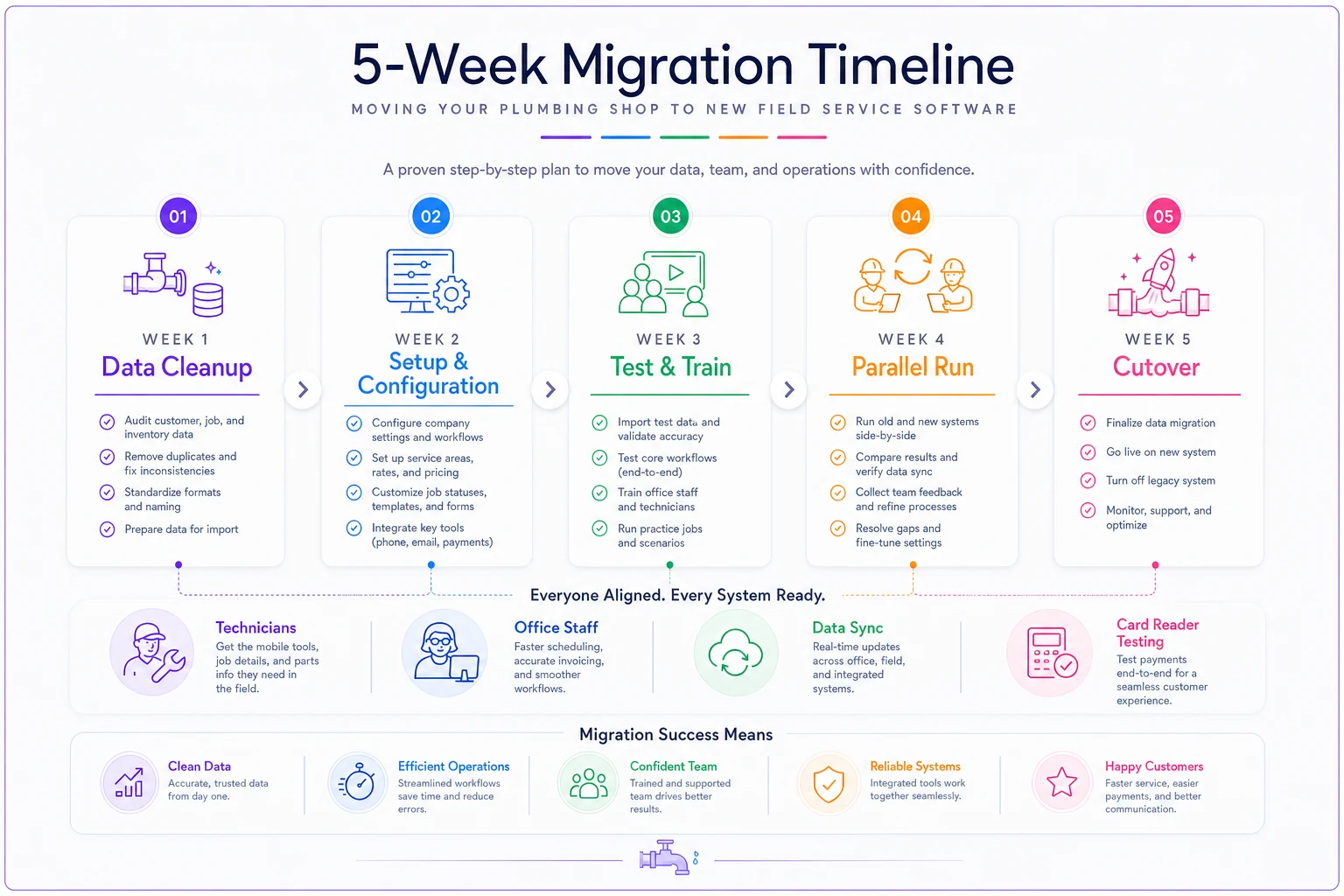
Shops that rush this — skipping the parallel run especially — are the ones who end up blaming the software when the real problem was a hurried migration.
A note on timing the purchase
Software decisions don't happen in a vacuum — they compete with hiring, truck purchases, and cash flow swings. A slower stretch is often the right time to migrate, because you have the bandwidth to clean data and train without it eating into peak-season revenue.
If demand is softening and you're already rethinking labor and scheduling, the operational logic in our rundown on immediate moves to make during a jobs slowdown pairs well with a software rollout — both are about tightening operations when you have a moment to breathe.
Bringing it together
The right answer isn't "buy the best software." It's "pick the right category for your truck count and your biggest operational leak, then evaluate three tools inside that category — not thirty across all of them."
For 1–2 trucks, lean toward accounting plus a light add-on unless you're growing fast. For 3–5 trucks, an all-in-one FSM is almost always the right shelf. For 6–10, start with a strong all-in-one and layer in specialized routing or inventory tools only where the platform's built-in versions fall short.
Whatever you choose, scrutinize the integration between the field and your books, and read the payment processing rates like your margin depends on it — because it does.
Whatever you choose, scrutinize the integration between the field and your books, and read the payment processing rates like your margin depends on it — because it does.
Ready to optimize your plumbing operations?
Join 500+ plumbing businesses using Plummerly to save time, reduce scheduling errors, and improve customer satisfaction.