



Most plumbing shops already take job photos. That's not the problem. The problem shows up eight months later when an insurer's adjuster asks for the "original file" of a shutoff valve photo, and what you hand over is a compressed image someone forwarded through a group text — no timestamp, no location, no way to prove it came from the job it's attached to.
At that point your documentation isn't evidence. It's a picture. And a picture that can't be authenticated is nearly worthless in a claims dispute or a subrogation fight.
The gap between "we take photos" and "we have insurance‑ready field documentation" is almost entirely governance — retention rules, metadata discipline, legal‑hold procedures, and clean handoffs between the field, the office, and outside parties. This piece covers building that governance layer so your documentation holds up when money is actually on the line.
If you haven't standardized the photo‑capture side yet — the required angles, the pre‑invoice audit — that's the foundation. Lock that down first. This article assumes you've got the capture basics and picks up where policy has to take over.
Why "good photos" quietly fail at the governance level
The failure isn't in the field. Techs generally take more photos than the office ever looks at. The failure is what happens after the shutter clicks.
The pattern is pretty consistent across shops of every size: photos end up living in three or four disconnected places at once. Some are in the field‑service app, some are in the tech's camera roll, a few got texted to a manager, and the "good" ones got downloaded and dropped into a job folder on someone's laptop. Each copy has slightly different metadata — or none at all, because texting and most chat apps strip EXIF data on the way out.
A few things break specifically at the governance level:
-
- No retention rule. Photos get deleted when a phone fills up or a tech leaves. There's no policy that says "job media is retained for X years, no exceptions."
-
- No chain of custody. Once a file is forwarded or re‑saved, you can't prove it's the original. That's the whole ballgame for authenticity.
-
- No legal‑hold mechanism. When litigation is even possible, you're legally required to stop normal deletion. Most shops have no button, no process, nothing.
-
- No standard for what "the record" is. Is the record the app, the folder, the email? If you can't answer that in one sentence, you don't have a system.
When a claim comes in, the office ends up rebuilding a timeline from memory. Which photo was "before"? Was the water heater already leaking when the tech arrived, or did the failure happen after? Nobody can prove it, because the file that could have proven it got mangled somewhere in the handoff.
The four pillars of an insurance‑ready documentation policy
Think of insurance‑ready field documentation as four connected systems, not four separate rules. They feed each other.
Stop missing service calls and double bookings.
Plummerly helps you schedule, assign, and manage every plumbing job efficiently.
- Centralized job scheduling
- Technician dispatch & tracking
- Customer notifications
No credit card required
-
1. Metadata standards — what has to be captured and preserved on every file.
-
2. Retention schedule — how long each category of record lives, and when it's purged.
-
3. Legal hold — how you freeze deletion the moment a dispute becomes foreseeable.
-
4. Claims & audit handoffs — how records move to adjusters, attorneys, and internal QA without losing integrity.
Get one wrong and the others leak. A perfect retention schedule doesn't help if the files have no metadata to authenticate them. Great metadata doesn't help if a legal hold never triggered and the files got auto‑deleted at 12 months.
Pillar 1: Metadata standards (what actually makes a photo "evidence")
A photo becomes evidence when you can answer three questions without hesitation: When was this taken? Where was it taken? What job does it belong to, and can you prove the file wasn't altered?
That means two layers of metadata. There's the embedded layer (EXIF — timestamp, GPS, device) that the camera writes automatically, and there's the structured layer your system attaches (job ID, customer, tech, capture stage). You need both, and you need them locked together.
Record the original file hash at capture and store it with the job record so you can validate the file later.
A minimum metadata standard worth adopting:
| Field | Source | Why it matters for claims |
|---|---|---|
| Original timestamp | Device EXIF | Establishes the "when" — critical for before/after sequencing |
| GPS coordinates | Device EXIF | Confirms the photo was taken at the service address |
| Job / work order ID | System‑attached | Links media to the specific job record |
| Capture stage (before/during/after) | Tech‑selected | Lets you sequence the work without guessing |
| Technician ID | System‑attached | Chain of custody — who captured it |
| Original file hash | System‑generated | Proves the file hasn't been altered since capture |
| Capture app version | System | Helps authenticate provenance if challenged |
The single biggest mistake here is letting photos leave the capture system in a way that strips metadata. The moment a tech texts a photo to dispatch, the EXIF is usually gone and the file is re‑compressed. From an evidentiary standpoint, that copy is now a downgraded reproduction, not an original.
The rule that fixes most of this: the original file never leaves the system of record. Everything else — the copy in the estimate, the version emailed to the adjuster — is a derivative, and it's labeled as one. The pristine original with intact metadata stays put, untouched, hashed at the moment of capture.
The hashing piece matters more than people expect. A file hash is essentially a fingerprint. If you record the hash when the photo is captured and it still matches years later, you have a strong argument that the image is exactly what was taken on the job — nobody altered the water damage in or out.
Worth being honest about where most shops actually are: very few have hashing in place, and even fewer have a clean separation between originals and derivatives. The metadata table above is the target, not an accusation. Start with timestamps and GPS locked in the system of record, get the forwarding habit under control, and the rest follows.
Pillar 2: Retention schedule (how long, and why the number isn't arbitrary)
"Keep everything forever" feels safe but it's not a policy — it's the absence of one, and it creates its own liability. If you retain records inconsistently, an opposing attorney will point at what you didn't keep and imply you cherry‑picked.
A real retention schedule sets a defensible number per record category and applies it uniformly. The right numbers depend on your state's statute of limitations for construction and contract claims and your carrier's requirements, so this is a conversation to have with your insurer and an attorney. A workable default structure looks like this:
-
- Standard job media (routine repairs) retain through the applicable warranty period plus the contract statute of limitations in your state, then purge on schedule.
-
- Water damage / mitigation / anything insurance‑adjacent longer retention, because these are the jobs that turn into claims and subrogation.
-
- Jobs involving code work, permits, or backflow align with permit and inspection record requirements, which often run longer.
-
- Incident‑related media (property damage, injury, callback that caused loss): the longest tier, and effectively frozen the moment an incident is logged.
The point isn't the exact durations. The point is that each category has a rule, the rule is written down, and deletion happens according to that rule — not because a phone filled up.
-
- Purging too aggressively. Deleting job media at 12 months to save storage feels efficient until a claim lands at month 18 and you have nothing. Storage is cheap. A denied subrogation recovery is not.
-
- Never purging at all. Ironically this is also a risk. Undisciplined infinite retention means old, irrelevant media sitting around that can be subpoenaed and taken out of context. A clean schedule is more defensible than a digital junk drawer.
A clean schedule is more defensible than a digital junk drawer.
Pillar 3: Legal hold (the process most shops don't have)
This is the pillar that separates a real policy from a nice‑looking document.
A legal hold is a mandatory suspension of your normal retention and deletion rules, triggered the moment litigation or a serious claim becomes reasonably foreseeable. Not when you get sued — when you can reasonably see it coming. If you delete records after that point, even automatically through your normal schedule, you're exposed to spoliation claims, which can be worse than the underlying dispute.
For a plumbing business, the triggers usually look like:
-
- A customer threatens to sue or mentions a lawyer.
-
- A property‑damage incident with real dollar value — flooded finished basement, damaged hardwood, mold.
-
- An insurer opens a claim tied to your work.
-
- An injury on a job site.
-
- A demand letter arrives.
The moment any of those happens, someone with authority needs to be able to freeze all related records — photos, videos, work orders, invoices, texts, notes — so nothing gets purged. That means:
-
1. A named person who has authority to issue a hold (owner, ops manager).
-
2. A written trigger list so field staff know when to escalate.
-
3. A mechanism to actually stop deletion for the affected job(s) — flagging those records so the retention schedule skips them.
-
4. A notice to everyone involved telling them to preserve everything and stop routine deletion.
-
5. A log of when the hold started, what it covers, and when it's released.
The most common real‑world breakdown: the trigger happens in the field — an angry customer says "I'm calling my attorney" — and the tech never tells anyone with the authority to freeze the file. Three months later the normal phone rotation wipes the camera roll, and the one photo that would have proven the damage pre‑existed your visit is gone.
That's why the legal‑hold process has to start in the field, not the office. Your intake and dispatch SOPs should include a "hold trigger" escalation the same way they include a safety escalation. If you've already documented your standard operating procedures in a copyable operations playbook, the legal‑hold trigger belongs right alongside your dispatch and QA steps — it's an operational reflex, not a legal afterthought.
Step two is where most shops stall in practice. The trigger list never gets written, so escalation depends on whoever happens to be paying attention that day. Write the list, laminate it, put it somewhere the field actually sees it.
Pillar 4: Claims & audit handoffs (moving records without breaking them)
Now the records have to leave your system — to an adjuster, an attorney, a warranty vendor, or your internal audit. This is where integrity gets lost if you're not deliberate.
The governing principle: originals stay put, derivatives go out, and every handoff is logged.
A clean claims handoff package includes:
-
- The relevant photos/videos as derivatives clearly labeled as copies, with a reference back to the original file and its hash.
-
- A manifest listing every file, its capture timestamp, GPS, job ID, and hash.
-
- The associated work order and invoice, so the media is tied to documented scope and cost.
-
- A short narrative sequencing before/during/after in plain language.
-
- A transmittal log entry
what was sent, to whom, on what date, in what format.
That transmittal log does real work. If an adjuster later claims they never received a key photo, or that you sent an altered image, you can point to exactly what left the building and when. Handoffs without a log are how "he said, she said" disputes start.
A workflow that holds together
-
1. Tech captures required photos in the app. EXIF is intact; the system attaches job ID, tech ID, and capture stage, and generates a hash on the spot.
-
2. Files sync to the system of record. The originals are now frozen and hashed. Nobody edits or forwards the originals — full stop.
-
3. The retention schedule tags the job by category (routine, water‑damage, permitted, incident) and assigns a purge date.
-
4. If a hold trigger fires at any point, the job is flagged and the purge date is suspended until the hold is released.
-
5. When a claim opens, the office generates a derivative package plus manifest, logs the transmittal, and sends it out.
-
6. At the audit cadence, a sample of jobs gets pulled and checked against the standard.
This diagram shows the workflow from capture to audit.
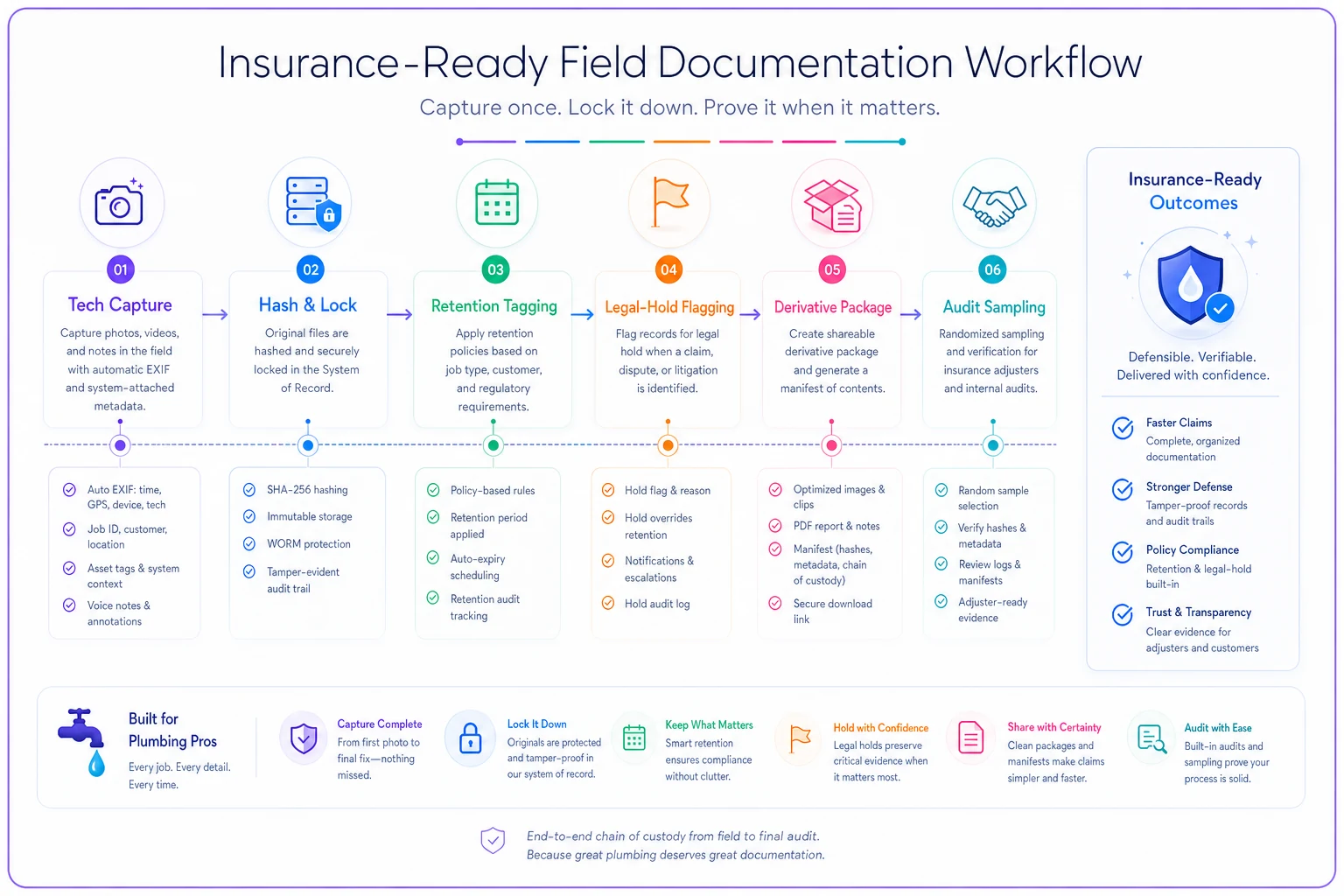
Keep the workflow enforced so records are defensible by default.
Audit cadence: catching drift before it costs you
Policies decay. Techs get busy, skip a required angle, forward an original "just this once." Without an audit cadence, you won't find out until a claim exposes the gap.
A practical cadence for a small‑to‑midsize shop:
-
- Weekly office spot‑checks a handful of recently closed jobs for complete metadata and required capture stages. Fast, five minutes.
-
- Monthly review any jobs flagged as water‑damage or incident‑related to confirm they were correctly categorized and whether a hold should have triggered.
-
- Quarterly confirm the retention schedule ran correctly — that jobs past their purge date actually purged, and that held jobs did not.
-
- Annually review the whole policy with your insurer and attorney against current statutes and carrier requirements.
The single metric worth tracking: the percentage of closed jobs that pass a full documentation check with zero exceptions. If that number is drifting down, your capture discipline is eroding, and you'll feel it the next time a claim lands.
Most shops that start weekly spot-checks find the biggest issue isn't missing photos — it's mislabeled capture stages. A "before" photo tagged as "after" can't be used to establish pre-existing conditions. Catching that in a five-minute weekly review rather than during a claims dispute is already worth running the cadence.
A realistic scenario
A five‑truck residential shop handled a water‑heater replacement in a finished basement. Six weeks later the customer reported flooring damage and filed a claim, alleging the tech's work caused a slow leak that ruined the subfloor.
Before this shop tightened its documentation policy, this is roughly where they'd have ended up: a couple of photos texted to the office, no timestamps, no way to prove the moisture staining under the old unit predated their work. The likely outcome — eat the cost or fight a losing battle, somewhere in the range of a few thousand dollars plus a chunk of admin time.
After adopting a metadata‑and‑hold standard, the same scenario played out differently. The "before" photos showed existing moisture staining under the failing original heater, with intact timestamps and GPS confirming the address. Because the customer had mentioned "getting someone to look into it legally" during the callback, the office had already flagged the job under a hold, so nothing was purged. The handoff package went to the adjuster with a manifest and matching file hashes.
The claim was resolved in the shop's favor on the pre-existing-condition argument. The numbers aren't the headline — the outcome hinged entirely on records that existed and could be authenticated, which is exactly what the governance layer exists to guarantee.
When this level of rigor makes sense — and when it's overkill
When it makes sense: if you do any water mitigation, water‑heater work, repipes, or anything in finished spaces, you're in claims territory whether you like it or not. The same goes for any shop carrying real exposure on property damage. Insurance‑ready documentation isn't bureaucracy at that point — it's how you avoid paying for damage you didn't cause.
When it's lighter: a one‑truck operator doing mostly small, low‑exposure repairs doesn't need the full quarterly‑audit apparatus on day one. But even a solo shop should get the two cheap, high‑value pieces in place: originals never leave the system of record, and there's a written trigger for freezing files when a customer gets litigious.
Who tends to get this wrong: growing shops in the 3–10 truck range. They've outgrown "I remember that job" but haven't yet built the governance to replace memory. That's exactly the window where one bad claim costs more than years of storage and process would have.
Where the software layer quietly earns its keep
You can run a version of this on discipline alone, but it gets fragile as volume grows. The parts that are genuinely hard to do by hand are: preserving EXIF through every handoff, hashing originals at capture, tagging jobs to a retention schedule that actually purges on time, and suspending that purge the instant a hold fires.
A field‑service platform that treats media as part of the job record — with automatic metadata capture, a locked original, and retention rules tied to job type — removes the two failure points that cause the most pain: files getting stripped in transit and records getting deleted when they shouldn't be. The goal isn't more software for its own sake. It's making the defensible outcome the default one, so nobody has to make the right call under pressure at 4 p.m. on a Friday.
That said, software doesn't fix a policy that was never written. The platform enforces the rules; you still have to write them, train the field on them, and actually run the audits. The shops that get real value out of AI-powered operational software are the ones that came in with a real process and used the platform to make it consistent at scale — not the ones hoping the software would substitute for the process entirely.
Bringing it together
Insurance‑ready field documentation isn't about taking better pictures. Your techs are probably already taking plenty. It's about the governance around those pictures — proving when and where they were taken, keeping them long enough and no longer, freezing them the moment a dispute is foreseeable, and moving them to third parties without breaking their integrity.
Those four pillars — metadata, retention, legal hold, and handoffs — only work as a connected system. Build them together, wire the triggers into your everyday dispatch and QA reflexes, and put an audit cadence on top so you catch drift early. Do that, and the next time an adjuster asks for "the original file," you'll have exactly what they need, exactly as it was captured, and the argument will be over before it starts.
Those four pillars — metadata, retention, legal hold, and handoffs — only work as a connected system. Build them together, wire the triggers into your everyday dispatch and QA reflexes, and put an audit cadence on top so you catch drift early. Do that, and the next time an adjuster asks for "the original file," you'll have exactly what they need, exactly as it was captured, and the argument will be over before it starts.
Ready to optimize your plumbing operations?
Join 500+ plumbing businesses using Plummerly to save time, reduce scheduling errors, and improve customer satisfaction.