



If you've already decided your fleet needs float capacity, you don't need another article telling you why. You need the numbers. How many minutes per job? When exactly do you pull the float truck off its route? What do you tell the customer when you queue them instead of dispatching? This is the companion piece to the strategy write-up on micro-buffer rules for very small fleets — except here everything is built to copy, paste, and run tomorrow morning.
Scope is deliberately narrow: 1–5 truck residential/light-commercial plumbing. Everything below assumes you already understand par-levels, zone clustering, and basic dispatch. We're filling the practical gaps.
Part 1: The Per-Job Micro-Buffer Table
The mistake most owners make is applying a flat percentage buffer to the whole day. "Add 15% to everything." That breaks down fast because the variance in a plumbing day doesn't really come from the job itself — it comes from travel segments and call density. A high-density suburban day with 8 short jobs has completely different slippage behavior than 4 spread-out rural ones.
So buffers get applied two ways: a per-job micro-buffer (padding each appointment) and a per-travel-segment pad (padding the drive between stops). Here's the working table.
Per-job micro-buffer (minutes added to each job's scheduled block)
| Density (calls per truck/shift) | Urban | Suburban | Rural |
|---|---|---|---|
| Low (3–4 jobs) | 10 min | 12 min | 18 min |
| Medium (5–6 jobs) | 12 min | 15 min | 22 min |
| High (7+ jobs) | 15 min | 20 min | 28 min |
Per-travel-segment pad (minutes added to each drive between stops)
| Density | Urban | Suburban | Rural |
|---|---|---|---|
| Low | 6 min | 8 min | 12 min |
| Medium | 8 min | 10 min | 15 min |
| High | 10 min | 14 min | 20 min |
-
Rural pads are higher even at low density because a single wrong turn or a gate code mix-up costs you 20 minutes you can't recover — there's no next stop two blocks away.
-
Urban high-density pads climb because of parking and access, not distance. The drive is short; getting from the truck to the actual work area is what eats time.
-
The per-travel pad is per segment, so a 6-stop day has 5 or 6 of them. Those add up faster than people expect, which is exactly why flat percentages consistently underestimate total daily buffer.
The per-travel pad is per segment, so a 6-stop day has 5 or 6 of them. Those add up faster than people expect, which is exactly why flat percentages consistently underestimate total daily buffer.
Part 2: Converting Percentage Buffers into Concrete Hours
This is where theory hits a real calendar and dies. "Keep a 20% buffer" sounds clean until you try to actually put it on a schedule. Below is how it converts for each fleet size using an 8-hour working shift (480 productive minutes, before buffer).
Stop missing service calls and double bookings.
Plummerly helps you schedule, assign, and manage every plumbing job efficiently.
- Centralized job scheduling
- Technician dispatch & tracking
- Customer notifications
No credit card required
Worked example — Suburban, Medium density
Assume each truck runs roughly 5–6 jobs averaging 70 minutes of on-site work, with 5 travel segments.
-
Job padding
5.5 jobs × 15 min = ~83 min
-
Travel padding
5 segments × 10 min = 50 min
-
Total daily buffer ≈ 133 min (~2.2 hrs)
Now scale it:
| Fleet size | Daily buffer (hrs) | Weekly buffer (5-day, hrs) | Reserved as float capacity |
|---|---|---|---|
| 1 truck | ~2.2 | ~11 | Partial-day float only |
| 2 trucks | ~4.4 | ~22 | ~Half a truck-day/week |
| 3 trucks | ~6.6 | ~33 | ~Three-quarters truck-day/week |
| 4 trucks | ~8.8 | ~44 | ~1 full float truck-day/week |
| 5 trucks | ~11 | ~55 | ~1.2 float truck-days/week |
The insight here: a single truck can't physically hold meaningful float — its "buffer" is just slack in its own day. You don't get a redeployable float truck until you're around 4–5 trucks, where aggregated buffer equals roughly one full truck-day a week. Below that threshold, your float is really schedule slack plus mutual aid, not a dedicated reserve. Owners who try to force a dedicated float truck at 2 trucks usually end up with one idle van and an unhappy tech.
Part 3: Daily Activation Rules (With Actual Thresholds)
Buffer sitting unused is wasted money. Buffer consumed too early leaves you exposed at 3 PM. You need numeric triggers, not gut feel. These are the activation thresholds that tend to hold up across small fleets.
Green (normal): Buffer consumption under 40% by noon. Run routes as planned.
Yellow (watch): Buffer consumption at 40–70% by noon. Dispatcher stops accepting same-day add-ons that aren't emergencies. Confirm afternoon jobs by phone to catch early cancellations.
Red (activate float / escalate): Buffer consumption over 70% by noon, or any single truck running 45+ minutes behind its scheduled block.
Escalation steps when you hit Red:
-
Reroute remaining jobs by zone proximity before pulling anyone off a route.
-
Pull the float block (if you have 4+ trucks) to absorb the next emergency intake.
-
Trigger the queue for non-emergency new calls (script in Part 6).
-
Call mutual-aid partner if a second emergency lands while float is already committed.
-
Cancel/reschedule the lowest-SLA job last, with the customer-recovery message.
Here's a quick workflow image to reference while following the escalation steps.
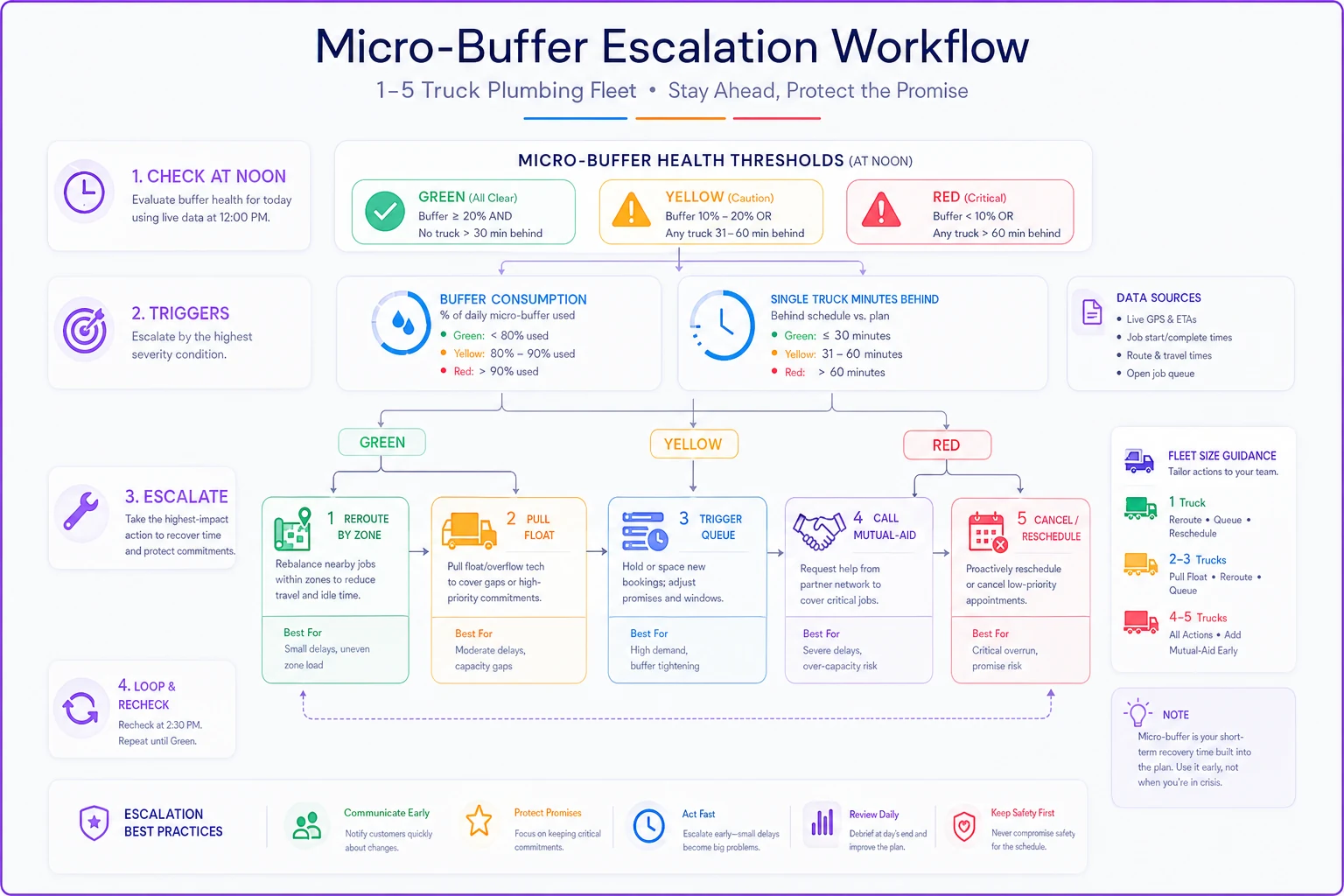
Where people go wrong: they escalate based on total behind-schedule time across the fleet. Don't. One truck 90 minutes behind is a Red trigger even if the other four are perfectly on time — that truck's emergency intake capacity is gone regardless of what everyone else is doing.
Part 4: Weekly Rotation & Roster Template
Float duty can't fall on the same tech every week. It's the least predictable role on the board and it burns people out. Rotate it. Here's a 5-truck weekly roster with protected blocks (untouchable scheduled work), float shifts, and a catch-up day built in.
| Truck | Mon | Tue | Wed | Thu | Fri |
|---|---|---|---|---|---|
| T1 | Protected | Protected | Float AM | Protected | Catch-up |
| T2 | Protected | Float AM | Protected | Catch-up | Protected |
| T3 | Float PM | Protected | Catch-up | Protected | Protected |
| T4 | Catch-up | Protected | Protected | Float PM | Protected |
| T5 | Protected | Catch-up | Float AM | Protected | Protected |
How to read it:
-
Protected blocks are booked jobs that dispatch is not allowed to cannibalize for emergencies.
-
Float AM/PM means that truck holds a half-day of open capacity. It takes scheduled work only if the week is light — otherwise it absorbs same-day emergencies.
-
Catch-up days are intentionally under-booked (~60% capacity) to clear callbacks, warranty returns, and jobs that slipped earlier in the week.
For 2–3 truck fleets, you can't afford a dedicated float column. Instead, each truck carries a float half-block on alternating days, and the catch-up day rotates weekly. It's messier, but it works. The point is that no single day runs at 100% booked — because 100% booked means any emergency breaks something.
Rotate float duty weekly to avoid burnout.
The point is that no single day runs at 100% booked — because 100% booked means any emergency breaks something.
Part 5: Triage Decision Matrix
When a new call lands and the day is already tight, the dispatcher needs one glance to decide. Four outcomes: Assign, Queue, Mutual-aid, or Cancel.
| Situation | Decision | Response time target | Customer message |
|---|---|---|---|
| Active emergency (no water, sewage, flooding), buffer available | Assign | On-site ≤ 2 hrs | "We're dispatching a tech now, ETA within 2 hours." |
| Non-emergency, buffer at Yellow | Queue | Call-back w/ slot ≤ 30 min | "We can get you booked — next available is [slot]. I'll confirm by text." |
| Second emergency, float already committed | Mutual-aid | Partner dispatch ≤ 90 min | "We're coordinating with a trusted partner crew to reach you fast." |
| Non-emergency, buffer at Red, no slots | Cancel/Reschedule | Reschedule ≤ 24 hrs | "Today's fully committed to emergencies — I can lock you in first thing tomorrow." |
Worth internalizing: Queue is the most underused option in small fleet dispatch. Most owners swing between assigning everything and turning people away. A clean queue with a confirmed callback window keeps the customer without burning your buffer. Most non-emergency callers are fine waiting if they have a defined slot — what loses them is vagueness.
Part 6: Dispatcher Phone & SMS Templates
Copy these. Edit the brackets.
Emergency assign (SMS):
> "Hi [Name], [Company] here. A tech is on the way for your [issue] — ETA [time]. Reply if anything changes. Please clear access to the [area] if you can."
Queue confirmation (SMS):
> "Hi [Name], you're booked for [date, window]. We'll text when the tech is ~30 min out. Questions? Call [number]."
Mutual-aid handoff (phone script):
> "We're fully committed on emergencies today, so we've arranged for [Partner Co.], a crew we trust, to handle your call. They'll reach you within about 90 minutes and bill at our quoted rate. That okay?"
Reschedule / cancel (phone script):
> "I want to be straight with you — every truck is on an emergency right now, so I can't promise today without leaving you waiting with no ETA. I'd rather lock you into [tomorrow slot] so you're first in line. Does that work?"
Mutual-aid checklist (set this up before you need it)
-
[ ] 2–3 partner shops in adjacent zones with a signed rate/billing agreement
-
[ ] Agreed referral fee or reciprocal split documented
-
[ ] Shared insurance/liability confirmation on file
-
[ ] A single contact number per partner (not a general line)
-
[ ] Standard job-handoff note format (address, issue, access, customer contact)
-
[ ] Post-job billing reconciliation process agreed in writing
The shops that handle overflow well set this up during a slow month. Trying to arrange mutual aid during a flood week is how you end up handing a customer to someone who undercuts you the following month.
Part 7: KPIs, Formulas & Reporting Cadence
Four metrics actually tell you whether your buffer is sized right. Track these and ignore the rest.
-
Buffer Consumption Rate = (buffer minutes used ÷ buffer minutes planned) × 100. Target: 60–80% weekly. Under 50% means you're over-buffering and leaving revenue on the table. Over 90% means you're one bad day from a real problem.
-
Emergency Fill Rate = emergencies handled in-house ÷ total emergencies received. Target: ≥ 85%.
-
Mutual-Aid Rate = jobs sent to partners ÷ total jobs. Target: under 5%. Spikes signal undersized float.
-
Schedule Slip = avg minutes each truck runs behind its planned block. Target: under 20 min/truck/day.
Cadence: Review Buffer Consumption and Schedule Slip daily at EOD — takes about 5 minutes. Review Emergency Fill and Mutual-Aid weekly. Re-tune the per-job buffer table quarterly, or sooner if a season shifts your density (storm season pushes most markets toward High density).
The common mistake is tracking these monthly. By the time a monthly report shows your buffer is undersized, you've already burned through a month of frustrated customers.
Part 8: Compensation for Float & Rapid Redeployment
Float duty is less predictable than a normal route, and your techs know it. If you don't address pay directly, your best people will quietly resist being assigned float — they'll just never say it out loud.
-
Float stipend a flat ~$15–$25 per float shift, paid whether or not they get pulled. It compensates the uncertainty, not just the hours worked.
-
Redeployment bump if a tech gets pulled mid-route to cover an emergency, a small per-incident bump (~$20–$30) offsets the disrupted flow and the lost efficiency on their original jobs.
-
Catch-up day protection don't count catch-up-day numbers against their utilization metrics. If you penalize the slower-by-design day, nobody wants it on their schedule.
Pay for the disruption, not just the hours. A tech who loses their rhythm getting bounced across town takes a real productivity hit, and pretending otherwise just erodes trust over time.
Part 9: Three Copy-Ready One-Page Checklists
✅ Morning Validation (run by 7:30 AM)
-
All trucks' routes loaded and zone-clustered
-
Per-job and travel pads applied to today's schedule
-
Float block confirmed and assigned (if 4+ trucks)
-
Catch-up day truck set to ~60% capacity
-
Parts for first two jobs per truck confirmed stocked
-
Mutual-aid partner contacts reachable today
-
Buffer consumption baseline = 0%, trigger thresholds confirmed
✅ Breakdown / Emergency Response
-
Log time emergency received + severity tier
-
Check current buffer consumption %
-
Apply triage matrix → Assign / Queue / Mutual-aid / Cancel
-
Send correct customer template (SMS or call)
-
If Red
reroute by zone before pulling float
-
If float committed + second emergency
trigger mutual-aid
-
Note the decision and time for EOD review
✅ End-of-Day Recovery
-
Record buffer consumption rate per truck
-
Record schedule slip (minutes behind) per truck
-
List any queued jobs carried to tomorrow
-
Flag callbacks/warranty returns for next catch-up day
-
Note any mutual-aid handoffs for billing reconciliation
-
If buffer hit >90% today, flag for roster adjustment
✅ End-of-Day Recovery
Part 10: Tooling — Modeling Float Blocks in Lightweight Dispatch Tools
You don't need enterprise software to run this. You need a dispatch tool that lets you do three things.
Selection criteria:
-
Blockable calendar slots — you can create a named, non-bookable "Float" or "Catch-up" block that staff can't accidentally fill.
-
Per-job duration overrides — so you can bake the micro-buffer into the job length rather than tracking it separately in your head.
-
Visible capacity view — a day/week view showing booked vs. open per truck at a glance, so you can eyeball the Yellow/Red thresholds without pulling a report.
Sample configuration notes:
-
Create recurring calendar events named "FLOAT – do not book" on the roster days from Part 4. Color them distinctly — red works — so they're visually obvious at a glance.
-
Set catch-up-day trucks to a reduced bookable capacity. Many tools let you cap daily appointments per resource. Cap it at ~60% of normal.
-
Build job templates with the buffer already included in the default duration. A "water heater replace" template set to 150 min instead of 120 min quietly enforces the pad without anyone doing math mid-dispatch.
-
Use a simple tag or custom field (
EMERGENCY/QUEUED) so your EOD report can filter by job type for the KPI review.
Whatever tool you're using — whether it's a full field-service platform or something lighter — the goal is the same: make the buffer and float structurally impossible to accidentally book over. The second a dispatcher can fill a float block without a deliberate override, the whole system quietly collapses back to 100%-booked chaos within a couple of weeks.
Start small. Pick the one row from the Part 1 table that matches your typical day, apply those two pads to tomorrow's schedule, and run the EOD recovery checklist for a week. You'll know within five working days whether your buffer is too thin or too fat by watching the consumption rate — anything stuck under 50% means you're sitting on revenue, anything brushing 90% means the next storm week is going to hurt.
The whole point of these tables and thresholds is to stop making the float a judgment call. When the rules are numeric and the templates are already written, a tired dispatcher at 2 PM on a Friday makes the same solid decision you'd make with a clear head on Monday morning. For the strategic reasoning behind why these blocks exist and how they fit into the bigger picture of very small fleet operations, the companion piece on micro-buffer rules for very small fleets covers the groundwork this playbook is built on.
Ready to optimize your plumbing operations?
Join 500+ plumbing businesses using Plummerly to save time, reduce scheduling errors, and improve customer satisfaction.