

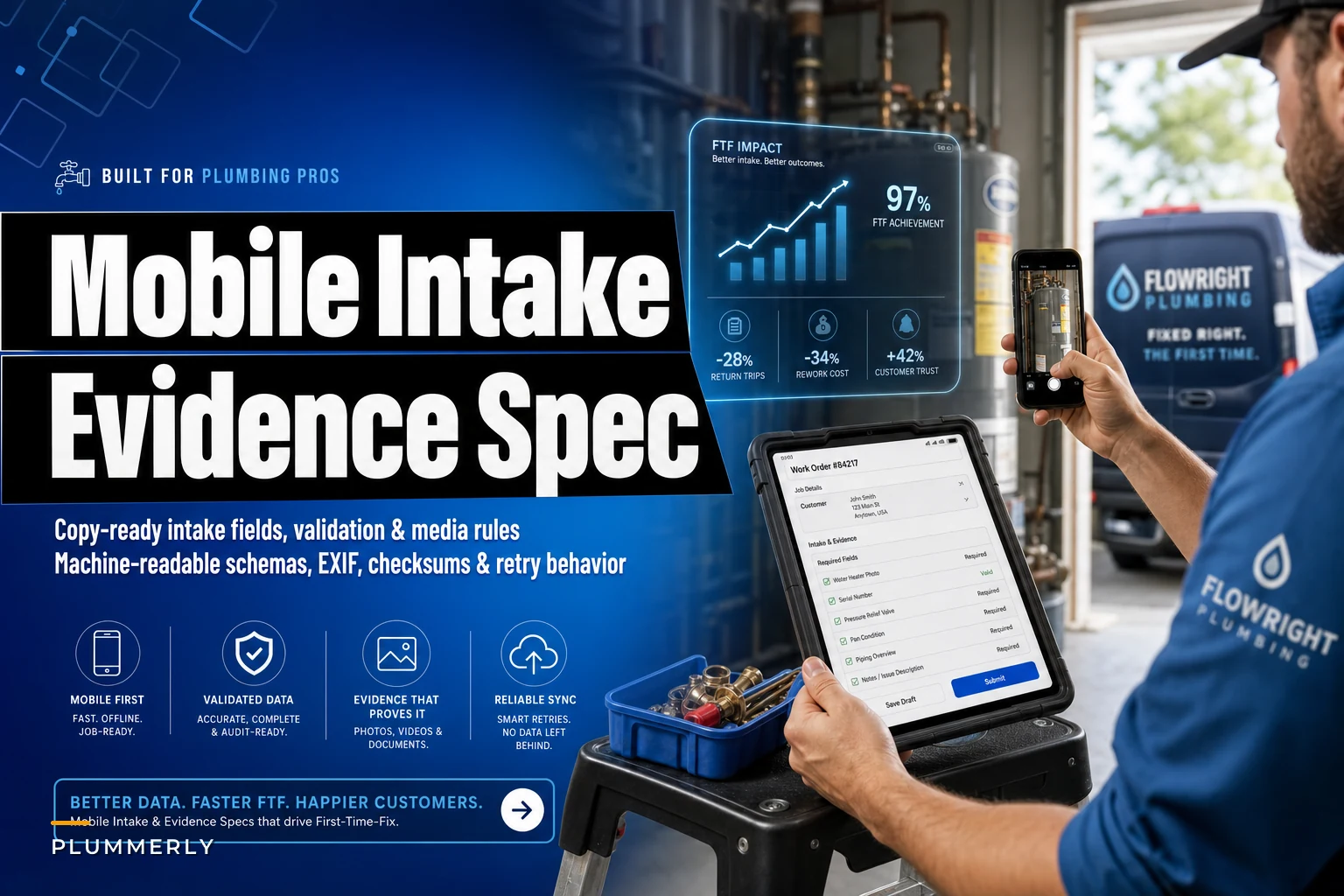

Most first-time-fix failures don't happen in the field. They happen the moment a tech captures — or doesn't capture — the evidence that would have let dispatch stage the right part, let the office approve the quote, and let the warranty desk pass an audit. The gap is almost never effort. It's that the mobile app accepted a blurry photo, an empty symptom field, and a work order with no model number, and nobody caught it until three days later when the return trip was already booked.
This is a build spec, not a philosophy piece. If you already have symptom checklists and parts staging dialed in from your First‑Time‑Fix Diagnostic Playbook, this is the layer underneath it — the exact field names, allowed values, validation rules, and machine-readable media requirements that make the diagnostic workflow enforceable instead of optional.
Hand this to whoever configures your FieldPulse/Commusoft/ServiceFusion forms or your custom mobile app. Everything below is copy-ready.
The core intake fields (copy-ready)
Start with a flat, predictable field schema. The mistake teams make constantly is naming fields inconsistently across the office app and the mobile app — wonumber in one place, workOrderId in another — which breaks every downstream mapping. Pick one naming convention (snakecase below) and enforce it everywhere.
| Field name | Type | Required | Allowed values / format | Validation rule |
|---|---|---|---|---|
workorderid | string | Yes | WO- + 8 digits | Must match ^WO-\d{8}$, must exist in FSM |
trade | enum | Yes | plumbing, hvac, electrical, appliance, garage_door | Drives conditional media requirements |
symptom_code | enum | Yes | See symptom table per trade | Must be valid for selected trade |
asset_type | enum | Yes | toilet, waterheater, hvacunit, kitchenappliance, washerdryer, garagedoor, electricalpanel, interior_drain | Required before media capture unlocks |
manufacturer | string | Conditional | free text, max 60 chars | Required if asset_type needs model lookup |
model_number | string | Conditional | alphanumeric, max 40 | Required for waterheater, hvacunit, appliances |
serial_number | string | Optional | alphanumeric, max 40 | Warn if blank on warranty jobs |
installdateest | date | Optional | ISO 8601 (YYYY-MM-DD) | Cannot be future date |
symptom_notes | text | Yes | free text, min 15 chars | Reject if under 15 chars or matches junk pattern |
diagnosis_summary | text | Yes | free text, min 25 chars | Required before quote generation |
resolution_status | enum | Yes | fixed, partsordered, quotepending, declined | Drives close-out logic |
customer_present | boolean | Yes | true / false | Affects consent capture requirement |
signature_captured | boolean | Conditional | true / false | Required when resolution_status = fixed |
The min 15 chars and min 25 chars rules matter more than they look. A field that accepts an empty string or a single period is functionally the same as not having the field at all. Techs under time pressure will type "n/a" — so pair the length check with a junk-pattern reject (more on that below).
The junk-input problem
The most common way an intake field fails in practice isn't a blank — it's a placeholder. symptomnotes gets filled with "leak", diagnosissummary gets "fixed it". Both pass a naive "not empty" check and both are useless in an audit.
reject_pattern: ^(n\/?a|none|test|\.|-{1,}|fixed|ok|good)$ Case-insensitive, trimmed. If the trimmed lowercase input matches, throw the validation error and block submission.
Machine-readable media specification
This is the part most FSM configs skip entirely, and it's where the money leaks. A photo requirement that just says "attach photo" gets you a picture of the truck floor. The spec needs to define which photos, at what quality, with what metadata.
Stop missing service calls and double bookings.
Plummerly helps you schedule, assign, and manage every plumbing job efficiently.
- Centralized job scheduling
- Technician dispatch & tracking
- Customer notifications
No credit card required
Global media rules (apply to all captures)
{ "mediaspecversion": "1.0", "allowedmimetypes": ["image/jpeg", "image/png", "image/heic", "video/mp4"], "minresolutionpx": { "width": 1280, "height": 960 }, "maxfilesizemb": { "image": 12, "video": 200 }, "maxvideodurationsec": 45, "requireexif": true, "requiretimestamp": true, "requiregeolocation": true, "geotolerancemeters": 150, "checksumalgorithm": "sha256", "filenamepattern": "{workorderid}{assettype}{shottype}{seq}.{ext}" }
A few of these worth calling out:
-
geotolerancemeters150
— compare the photo's GPS coordinates against the service address geocode. If it's off by more than ~150m, flag it. This is your single best defense against a tech uploading photos taken at the shop or from a previous job. Keep the tolerance loose enough for dense urban geocoding error but tight enough to catch obvious mismatches. -
checksum_algorithmsha256
— compute a hash on the device at capture time. Store it with the record. If the file ever changes between upload and archive, the hashes won't match, and your warranty audit trail stays defensible. -
filenamepattern— this single rule saves hours. A file namedWO-40382914waterheaterdataplate01.jpgis self-documenting. A file namedIMG4471.jpgis a liability.
Required shot types by asset (the 8-case mapping)
| Asset | Required shots | Optional shots | Video required? |
|---|---|---|---|
| Toilet | overview, baseseal, shutoffvalve, fillvalveinternal | flooring_damage | No |
| Water heater | fullunit, dataplate, tandpvalve, connectionstop, drainpan | expansion_tank, venting | No |
| HVAC unit | outdoorunit, dataplate, indoorcoil, electrical_disconnect, filter | thermostat_reading | Yes — refrigerantgaugereading (15s) |
| Kitchen appliance | fullappliance, dataplate, failurepoint, watersupplyconnection | install_clearance | No |
| Washer/dryer | fullunit, dataplate, hoseconnections, drain_standpipe | vent_run (dryer) | No |
| Garage door | fulldoorclosed, openerunit, springassembly, sensor_alignment | track_damage | Yes — door_cycle (30s) |
| Small electrical panel | panelfullopen, mainbreaker, affectedcircuit, panel_label | thermal_reading | No |
| Interior drain | drainaccess, cleanout, blockageevidence, camerafootagestill | pipe_material | Yes — scope_pass (30s) |
Worth flagging: the dataplate shot is required on every asset that has a model number. Missing dataplate photos are the number-one reason a warranty claim gets kicked back and the number-one reason a parts order goes out for the wrong SKU. Make it required, make it blocking, and add a resolution check (below) so it's actually legible.
Dataplate legibility check
A blurry dataplate photo is worse than none — it creates false confidence. Where your app supports it, run an on-device OCR pass on the dataplate shot and require at least one alphanumeric string of 6+ characters to be extracted before accepting it. If OCR fails, prompt: "Data plate text couldn't be read. Move closer and retake."
Sample JSON Schema for a media object
A validatable schema snippet for a single evidence item. Drop it into your API validation layer.
{ "$schema": "http://json-schema.org/draft-07/schema#", "title": "FTFEvidenceItem", "type": "object", "required": ["workorderid", "assettype", "shottype", "mimetype", "checksumsha256", "capturedat", "geo", "filesizebytes"], "properties": { "workorderid": { "type": "string", "pattern": "^WO-\\d{8}$" }, "assettype": { "type": "string", "enum": ["toilet","waterheater","hvacunit","kitchenappliance", "washerdryer","garagedoor","electricalpanel","interiordrain"] }, "shottype": { "type": "string", "minLength": 3 }, "mimetype": { "type": "string", "enum": ["image/jpeg","image/png","image/heic","video/mp4"] }, "filesizebytes": { "type": "integer", "minimum": 20480 }, "resolution": { "type": "object", "properties": { "width": { "type": "integer", "minimum": 1280 }, "height": { "type": "integer", "minimum": 960 } }, "required": ["width","height"] }, "checksumsha256": { "type": "string", "pattern": "^[a-f0-9]{64}$" }, "capturedat": { "type": "string", "format": "date-time" }, "geo": { "type": "object", "required": ["lat","lng","accuracym"], "properties": { "lat": { "type": "number" }, "lng": { "type": "number" }, "accuracy_m": { "type": "number", "maximum": 100 } } } } }
Note filesizebytes.minimum: 20480 — a 20KB "photo" is a thumbnail or a corrupt capture. Rejecting tiny files catches a surprising number of upload glitches before they reach your archive.
Sample API payload (full job close-out)
{ "workorderid": "WO-40382914", "trade": "plumbing", "assettype": "waterheater", "symptomcode": "nohotwater", "manufacturer": "Rheem", "modelnumber": "XE50M06ST45U1", "diagnosissummary": "Upper heating element failed open, ~11 ohms expected, reading OL.", "resolutionstatus": "partsordered", "customerpresent": true, "consentmedia": true, "evidence": [ { "shottype": "dataplate", "mimetype": "image/jpeg", "checksumsha256": "3f9a...c21", "capturedat": "2025-01-14T15:22:08-06:00", "geo": { "lat": 29.7601, "lng": -95.3701, "accuracym": 8 } } ] }
Acceptance criteria ↔ evidence mapping
This is the table your QA/audit automation runs against. Each resolution_status has a set of acceptance criteria, and each criterion maps to a specific piece of evidence. If the evidence isn't present and valid, the job can't advance to that status.
| Resolution status | Acceptance criteria | Required evidence |
|---|---|---|
fixed | Work verified complete + customer sign-off | All required shots + signature_captured = true + post-repair overview shot |
parts_ordered | Correct part identified | Valid dataplate (OCR pass) + modelnumber populated + failurepoint shot |
quote_pending | Scope documented for office quote | diagnosis_summary ≥ 25 chars + all required shots for asset |
declined | Customer decline documented | symptom_notes + one overview shot + decline reason field |
The key design decision here: acceptance criteria are enforced at status transition, not at photo upload. Techs can capture in any order during the visit. The blocking check fires only when they try to mark the job fixed or push it to the office. This keeps the field experience flexible while keeping the data clean.
Copy-ready UI validation & error messages
The wording of an error message determines whether a tech fixes the problem or finds a workaround. Vague messages ("Invalid input") get gamed. Specific messages get complied with.
-
Missing required shot "Add the T&P valve photo before closing this job. Tap the camera icon next to 'T&P valve' in the checklist."
-
Low resolution "That photo is too small to read. Retake from about 2 feet away with good light."
-
Geo mismatch "This photo's location doesn't match the service address. If you're on-site, check that location services are on and retake."
-
Blurry dataplate "Data plate text couldn't be read. Move closer and hold steady for a second before capturing."
-
Junk text field "Add a short description of the actual symptom — 'n/a' and 'fixed' won't pass the office review."
-
Short diagnosis "Diagnosis needs a bit more detail before we can build the quote. What failed and how did you confirm it?"
All of these tell the tech what to do next, not just what's wrong. That's the difference between a validation rule that improves data quality and one that just annoys people until they route around it.
Offline & latency handling
Techs work in basements, mechanical rooms, and dead zones. A spec that assumes connectivity will fail in exactly the moments it matters most. Define this behavior explicitly in your app.
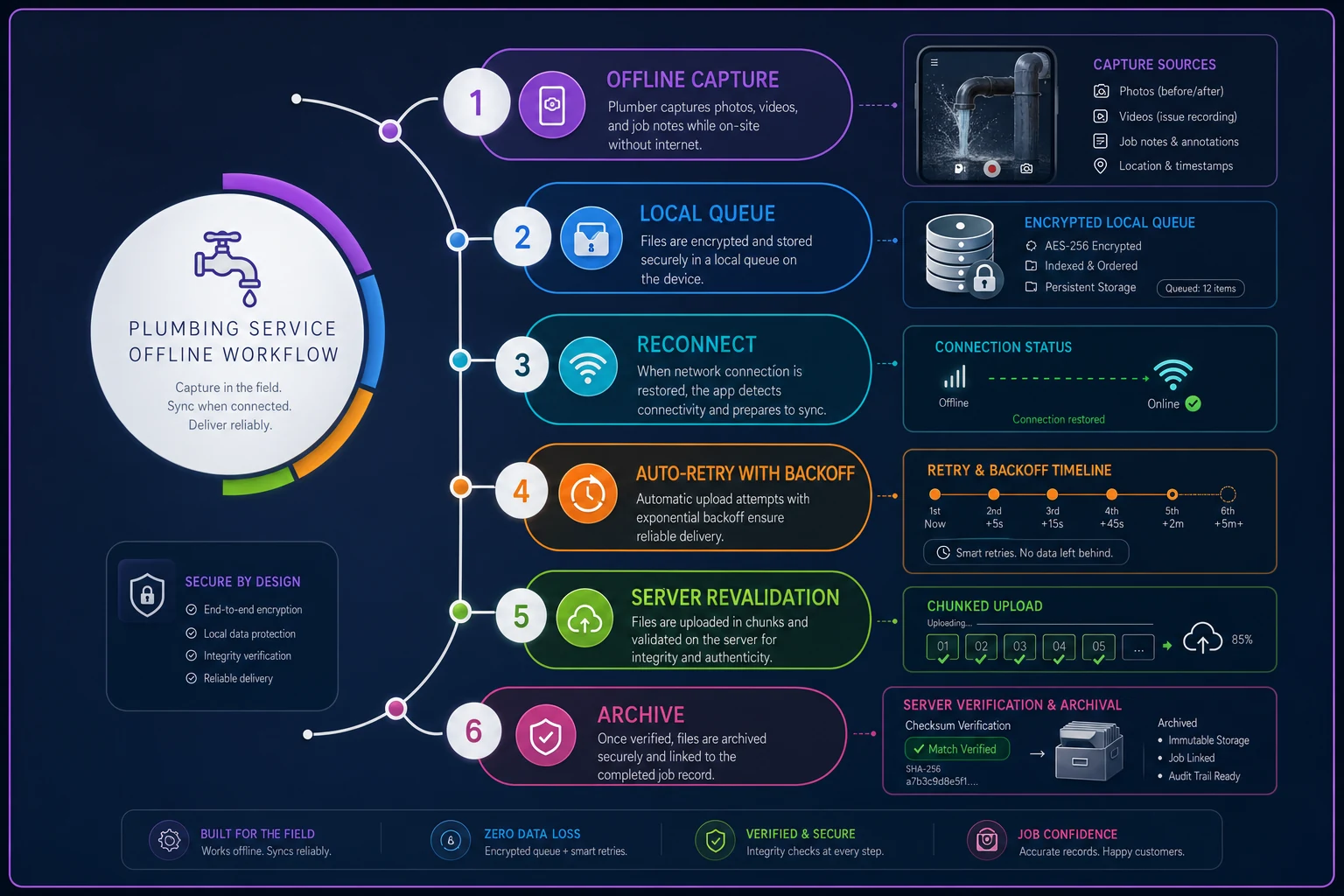
The flow above should be wired in before anything else. Here's how each step should behave:
-
Capture works fully offline. All validation that can run locally — resolution, file size, EXIF presence, checksum, geo capture, junk-text patterns — runs on-device at capture time. Nothing waits for a server round-trip to tell the tech a photo is too small.
-
Queue with local persistence. Evidence items and the work-order payload write to a local encrypted store immediately. If the app crashes or the phone dies, nothing is lost.
-
Auto-retry with backoff. On reconnect, upload the queue with exponential backoff (e.g., 5s, 15s, 60s, 5min) and a max retry count. Don't hammer a weak signal.
-
Chunked upload for video. Break the 200MB video ceiling into chunks so a dropped connection resumes instead of restarting.
-
Server-side revalidation. When the payload lands, re-verify the checksum and re-run schema validation. On-device checks are for UX; server checks are for trust. Never assume the client was honest.
-
Status visibility. The tech sees a clear per-item state
queued,uploading,uploaded,failed. Ambiguity here creates the "I thought it sent" return trips.
The retry-and-checksum combination is what lets you tell a warranty adjuster, with confidence, that the photo they're looking at is the exact file captured on-site at the timestamped location — unmodified.
Privacy & consent language
Photos and video of a customer's home carry real obligations. Bake consent into the intake so it's captured, timestamped, and stored — not left to the tech's memory.
> "To complete your service and support any warranty or insurance needs, our technician will take photos and, where noted, short videos of the equipment and affected areas. These may include parts of your home visible during the work. We store them securely and use them only for service records, warranty, and quality review. Let your technician know if there's anything you'd prefer not photographed."
Two practical rules that keep you out of trouble:
-
Never require faces or people in any shot.
-
Give an opt-out path.
If a person is unavoidably in frame, the tech should reframe. None of the required shot types above should include occupants.
If a customer declines media, the tech logs consent_media = false with a reason, and the job routes to a supervisor for a manual close-out exception rather than silently failing.
Implementation notes: FSM/ERP integration & QA automation
A spec is only as good as the pipes it flows through. A few integration decisions determine whether this holds up in production.
Map to your FSM's custom field IDs, not display labels. FSM platforms rename display labels but keep internal IDs stable. Bind your validation to the internal ID so a label edit doesn't silently break a rule. Keep a small mapping file: your canonical field name → the platform's field ID.
Push evidence metadata to the ERP, store binaries in object storage. Don't stuff 200MB videos into your ERP. Store files in object storage (S3-style), keep the checksum and URL reference on the job record, and let the ERP hold the lightweight metadata. Your job-costing and warranty records stay fast and queryable.
Run audit automation on a nightly sweep, not just at close-out. A daily job that re-runs the acceptance-criteria checks across all jobs closed that day catches drift — a tech who found a way around a rule, a platform update that broke a validation. Flag exceptions to a review queue with the specific failed criterion named.
Version the spec. The mediaspecversion field in the payload lets you evolve requirements without breaking historical records. When you add a required shot next quarter, jobs closed under v1.0 stay valid under v1.0, and new jobs enforce v1.1.
When this level of rigor makes sense — and when it doesn't
This spec is worth implementing fully if warranty and insurance work is a meaningful slice of your revenue, if return-trip rates are eating your margins, or if you're running enough trucks that you can't personally eyeball every job's photos.
It's overkill for a single owner-operator doing mostly cash-and-carry service calls where you're the one taking the photos and filing the claims — you already carry the context in your head. Start with just the required-shot list and the dataplate rule; skip the checksums and OCR until volume justifies them.
Where teams go wrong is trying to enforce everything at once. Techs revolt, they find workarounds, and the data ends up worse than before. Roll it out in layers:
-
Required fields first.
-
Then required shots.
-
Then resolution and geo validation.
-
Then checksums and audit automation.
Each layer earns trust before the next one lands.
Real scenario
A five-truck shop doing a fair amount of water-heater and drain work was averaging a return-trip rate somewhere around 18–20% on those job types — mostly wrong parts and warranty claims bounced for missing documentation. The pattern was consistent: techs captured a photo, just not the dataplate or the failure point, and nobody caught it until the part arrived wrong or the manufacturer rejected the claim.
They implemented the required-shot list and the blocking dataplate rule first — no checksums, no OCR, just "you can't mark it fixed without these four photos." Within about two months the return-trip rate on those job types dropped to roughly 11–12%. The dataplate requirement alone cut most of the wrong-part orders, because the parts desk finally had a legible model number every time. They added geo-validation and audit automation later, mostly to clean up warranty claim rejections, which is a slower-moving number but trended down over the following quarter.
Nothing about that outcome was clever. It was just moving the enforcement point from "the tech remembers" to "the app won't let the job close without it."
Closing thought
First-time-fix rates stall not because techs lack diagnostic skill — they know what a failed heating element looks like. It's that the evidence proving the diagnosis, staging the right part, and passing the audit gets captured inconsistently, and the mobile app happily accepts garbage.
A tight intake and evidence spec turns "please remember to take good photos" into a rule the software enforces, quietly, on every single job. Build the schema once, wire it into your validation layer, and the return trips you stop paying for cover the implementation cost fast.
First-time-fix rates stall not because techs lack diagnostic skill — they know what a failed heating element looks like. It's that the evidence proving the diagnosis, staging the right part, and passing the audit gets captured inconsistently, and the mobile app happily accepts garbage.
A tight intake and evidence spec turns "please remember to take good photos" into a rule the software enforces, quietly, on every single job. Build the schema once, wire it into your validation layer, and the return trips you stop paying for cover the implementation cost fast.
Ready to optimize your plumbing operations?
Join 500+ plumbing businesses using Plummerly to save time, reduce scheduling errors, and improve customer satisfaction.