


Most plumbing owners don't struggle with the idea of par levels. They struggle with the gap between "I know roughly what should be on each truck" and "this is now living correctly inside FieldPulse with SKUs, bins, and reorder triggers that fire on their own."
That gap is where everything falls apart. You build a decent matrix, and then it sits in a tab nobody opens. Six weeks later a tech is standing in a crawlspace without a 3/4" shark bite, and you're paying for a return trip you already "solved" on paper.
This template pack exists to close that gap. It's a plumber-specific Google Sheet (plus CSV export) that comes pre-filled with the columns, naming conventions, sample usage data, formulas, and conditional formatting you'd otherwise spend a weekend building wrong. If you've already read the Truck Parts Par‑Level Matrix for Plumbers, this is the asset that makes that matrix executable instead of theoretical.
Below I'll walk through what's in the sheet, the decisions baked into it, and how to get it into your system without blowing up your existing inventory data.
## What's actually inside the sheet
The whole point of a template is that the hard thinking is already done. Here's what you're getting, tab by tab.
Tab 1 — Par Matrix (the main sheet). Pre-filled with the recommended column structure, sample SKUs, bin naming, 12 months of realistic usage data, and working formulas. You edit numbers, not architecture.
Tab 2 — Seasonal Factors. A small lookup table that adjusts par levels by month so your winter freeze-season stock and your summer slab-leak season stock aren't forced to be the same number.
Tab 3 — FSM Mapping Sheets. Separate CSV-ready layouts formatted for the common platforms, so you're not hand-matching columns at import time.
Tab 4 — Import Checklist & Rollback. A step-by-step list plus the "undo" plan for when something imports sideways.
Tab 5 — Tech Training Script. Short enough to read out loud at a Monday morning huddle.
Here's the column structure on the main tab, and the reasoning behind each one — because the columns are 80% of why most homemade par sheets fail:
| Column | What it holds | Why it's there |
|---|---|---|
SKU | Your internal part code | The join key between sheet and FSM. Everything breaks without a clean one. |
Part Description | Plain-English name | What techs actually search for in the field |
Bin | Physical location code (e.g. T2-A3) | Turns a count into a 5-second visual check |
UOM | Unit of measure (ea, box, ft) | Prevents "10 boxes vs 10 fittings" disasters |
Avg Monthly Usage | 12-month average | The denominator for everything |
Lead Time (days) | Supplier restock time | Drives the reorder point |
Par Level | Target on-truck quantity | The number techs count against |
Reorder Point | Trigger quantity | When to actually buy, not when you hit zero |
Seasonal Factor | Multiplier (0.8–1.4) | Adjusts par by month |
Adjusted Par | Par × seasonal factor | The real target this month |
The columns people usually skip are Bin, UOM, and Lead Time. Leaving out Bin means your 5-minute count becomes a 25-minute scavenger hunt. Leaving out UOM is how you end up with a tech ordering a case when he needed a single. And skipping Lead Time turns your reorder point into a guess.
## The naming conventions, and why they're not optional
SKU and bin naming feels like a nitpicky detail until you try to import 140 parts and the system rejects half of them for duplicate or malformed codes.
Stop missing service calls and double bookings.
Plummerly helps you schedule, assign, and manage every plumbing job efficiently.
- Centralized job scheduling
- Technician dispatch & tracking
- Customer notifications
No credit card required
-
SKUs category prefix + size + type. Example:
FIT-034-SBfor a 3/4" SharkBite. Short, sortable, and readable at a glance. -
Bins truck + zone + slot. Example:
T2-A3means Truck 2, bin wall A, slot 3.
When every SKU follows the same pattern, your FSM platform's bulk import stops choking, your reports sort cleanly, and a new tech can learn the system in a day instead of a week. Shops with messy par data almost always have messy naming underneath it. The quantities are usually fine. It's the codes that rot over time.
One thing worth flagging — avoid putting spaces, slashes, or apostrophes in SKUs. A SKU like 3/4" SB Fitting survives in a spreadsheet and then dies on import because the slash and quote break the CSV parse. The template strips those out, but if you add your own parts, keep the convention.
## The sample usage data (and why it's "messy" on purpose)
The sheet ships with 12 months of fake-but-realistic usage per part. It's intentionally uneven — some parts spike in January and February, some are flat all year, a couple have random one-off spikes that look like a single big job.
That messiness is the point. If sample data is perfectly smooth, the formulas look great and teach you nothing. Real usage has a water-heater-season bump and a weird month where somebody repiped a whole house and burned through 40 fittings in one visit.
The template handles that spike problem with a trimmed average in the Avg Monthly Usage formula, so one freak month doesn't permanently inflate your par level and bury cash in parts you'll never move. A typical example: a part averages 6/month, but one repipe job pushed March to 44. A plain average says stock ~9. The trimmed version keeps it near 6–7, which is much closer to what your normal week actually looks like.
## The formulas, explained in plain terms
You don't need to understand the formulas to use the sheet — they're already written — but you should know what they do so you trust the output.
Par Level = average monthly usage, scaled to how often you restock. If you restock weekly, par roughly covers a week plus a safety cushion.
Reorder Point = (average daily usage × lead time in days) + safety stock. This is the number that trips the "buy now" flag. The common mistake is setting the reorder point at zero — meaning you reorder when you're already out. With a 5-day lead time and a part that moves once a day, your reorder point should sit around 6–8, not 0.
Seasonal Factor multiplies par by a monthly adjustment pulled from Tab 2. December might run 1.3 on freeze-related fittings; a slow spring month might sit at 0.9. The Adjusted Par column shows the real target for the current month, so you're not carrying January stock in July.
The conditional formatting then does the visual work: cells turn red when on-hand drops below reorder point, yellow when it's between reorder point and par, and green when you're stocked. When your office manager opens this sheet on Monday, the reorder list is literally the red rows. No filtering, no thinking required.
## Getting it into your FSM platform without breaking anything
This is where most imports go wrong, so the pack treats it like a deployment, not a copy-paste.
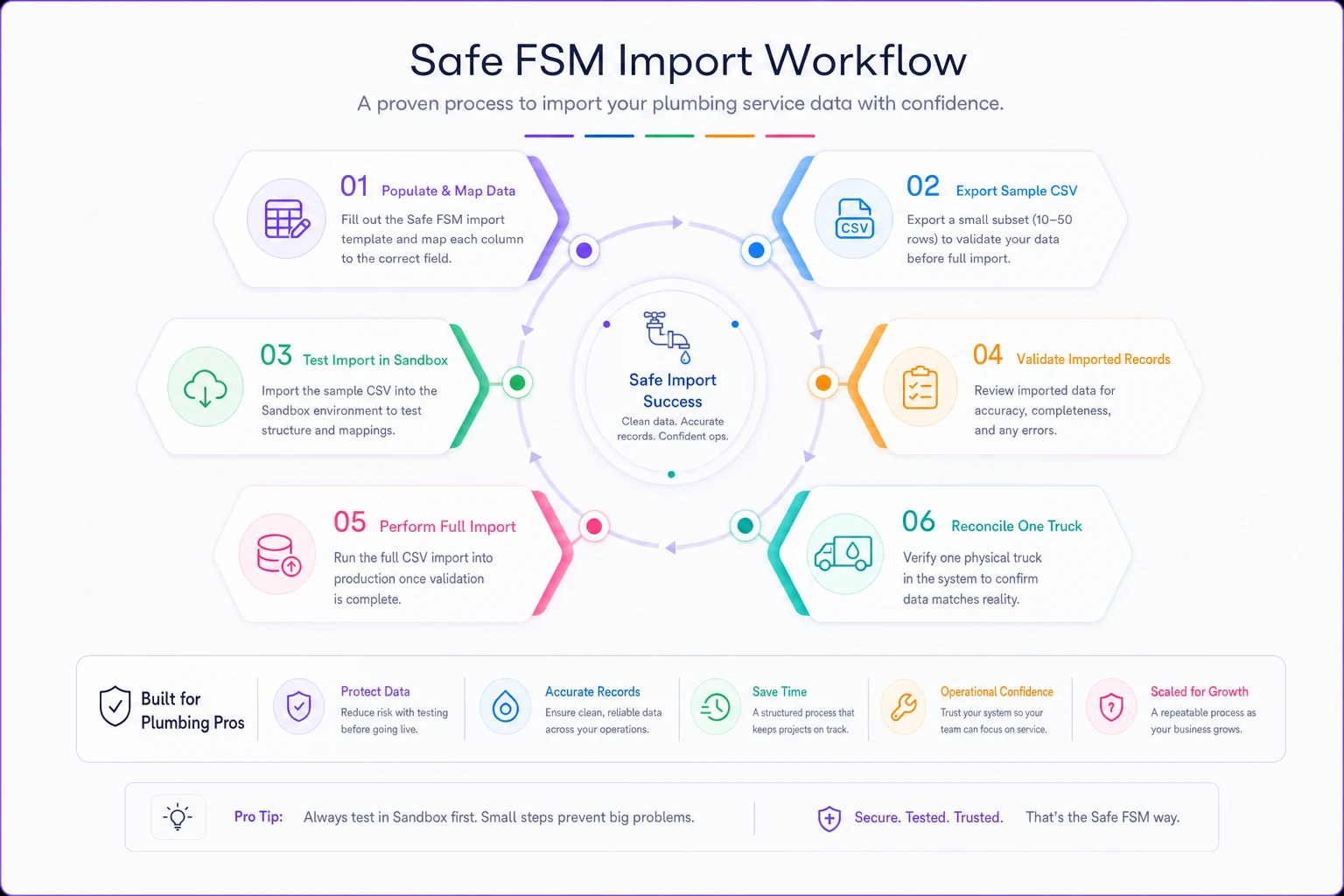
Here's the recommended sequence:
-
Populate and map (30–120 min). Replace the sample SKUs and usage with yours. Use the mapping tab that matches your platform so columns line up before you export.
-
Export a CSV of 10 rows only. Don't import 140 parts first. Test with ten.
-
Run the test import (1–2 hours). Push those 10 rows into a sandbox or a single truck's location. Watch what breaks — usually SKU formatting or UOM mismatches.
-
Validate the test batch. Open the FSM record for each of the 10 and confirm par, bin, and reorder values landed in the right fields.
-
Full import + validation (1–3 hours). Once the 10 are clean, push the rest. Spot-check 15–20 records across different categories.
-
Reconcile one physical truck. Walk out to a truck, count it, and compare to the sheet. If the numbers disagree, your data is wrong, not your truck.
The reason the 10-row test matters: a bad full import of 140 parts creates 140 cleanup problems. A bad 10-row test creates 10 — and tells you exactly what to fix before the big push. Shops that skip the test import almost always end up re-importing twice.
A visual workflow for the safe import process.
The rollback plan
Before any full import, export your current inventory data from the FSM platform and save it with a date in the filename. That's your rollback file. If the import corrupts quantities or duplicates SKUs, you re-import the saved file and you're back to where you started.
-
- [ ] Exported current FSM inventory before importing
-
- [ ] Saved it with a clear dated filename
-
- [ ] Confirmed you know the re-import path in your platform
-
- [ ] Tested the rollback once on the sandbox so it's not your first time during a fire
Nobody thinks they'll need the rollback until a bulk import overwrites live quantities on a Friday afternoon. Thirty seconds of prep saves a weekend.
## A short, real scenario
A three-truck residential shop was running par levels in a shared doc that nobody updated. Their recurring problem: roughly 3–4 return trips a week for missing common fittings and valves, each one burning an hour of drive time plus whatever appointment slot they couldn't fill.
They moved onto the template, mapped it to their FSM platform over an afternoon, and — this is the part that actually mattered — reconciled each truck against the sheet before trusting it. Within about six weeks, return trips for stock-outs dropped to roughly one a week. Not zero. One. But that's two or three recovered appointment slots weekly, which penciled out to something in the low thousands per month in capacity they weren't losing anymore.
The win wasn't the spreadsheet being clever. It was that reorder points finally fired before zero, and the seasonal factors stopped them from carrying summer quantities into freeze season.
## When this template is the right move
It fits well if you run 1–10 trucks, you already have some sense of what parts move, and your inventory lives in a spreadsheet or a lightly-used FSM module. It's also a natural fit if you've already built a matrix from the par-level matrix workflow and just need to operationalize it.
When it's a bad idea
If your part descriptions are inconsistent across trucks — same fitting called three different names — fix the naming first. Importing messy names just makes the mess queryable. Spend an hour standardizing before you populate the sheet.
It's also the wrong tool if you're managing a central warehouse with thousands of SKUs and multiple suppliers per part. This is built for truck stock and small-fleet reality, not distribution-grade inventory.
Who should skip it entirely
Single-owner-operator with one truck and 30 parts you know by heart? You probably don't need seasonal math. A one-page count sheet taped inside the door does the job. The template earns its keep once you have more than one truck and more than one person touching stock — because that's when "what's on the truck" stops being something one brain can hold.
## The training script matters more than the sheet
A par system only works if the techs draining the stock also respect the count. The pack includes a short script because the data decays the moment field reality stops matching the sheet.
The script covers three things: how to read the bin codes, when to flag a part as low (at yellow, not red), and the one rule that keeps everything alive — count at the same time every week. Friday afternoon, tailgate down, five minutes. Consistency beats accuracy here. A slightly rough count done every week is worth far more than a perfect count done once a quarter.
Schedule a recurring calendar reminder for the weekly five‑minute count so it becomes a habit.
The shops whose par systems survive are the ones where counting became a habit, not a project. The template gives you the structure. The weekly five minutes is what makes it stick.
A par-level plan that lives in your head costs you return trips. One that lives in a spreadsheet nobody maintains costs you the same return trips plus the time you spent building it. The difference with this pack is that it's designed to actually land inside the system your techs already use — with the naming, formulas, and rollback safety that make the import survivable.
Populate it, test with ten rows, reconcile against one real truck, then roll it out. Budget an afternoon. The payback shows up the first week a tech reaches for a 3/4" fitting and it's exactly where the bin code said it would be.
Ready to optimize your plumbing operations?
Join 500+ plumbing businesses using Plummerly to save time, reduce scheduling errors, and improve customer satisfaction.