



Most plumbing shops don't have a time-tracking problem. They have a time-classification problem. The clock is running — but the time gets dumped into buckets that don't match how you actually cost jobs. So when you pull a labor number to check margin, it's soft. Slightly wrong on every job, in ways that quietly compound.
The classic version: a tech clocks in at 7:12am, clocks out at 4:48pm, and everything in between is one big blob of "work." No split between drive time, the diagnostic hour, the actual repair, the two truck-stock runs, and the 40 minutes he spent on hold with a supply house waiting on a part number. That blob gets divided across two or three jobs by whoever does payroll, using their best guess. And that guess becomes your job cost.
If you're trying to build real job costing or feed clean numbers into dashboards, this is where it breaks. Fix the capture rules first, then the exception handling, then the reconciliation that catches what slips through.
The core problem: travel and "in-between" time have no home
Ask ten plumbers how they book travel time and you'll get ten different answers. Some bury it in the first job. Some don't charge it at all and eat it. Some split it evenly across the day regardless of distance. Every one of those approaches poisons your per-job labor cost.
Time capture for plumbing travel is the single biggest source of misallocation because it happens between the events people actually remember to log. A tech remembers he was at the Hendersons' for the water heater. He doesn't naturally think "I drove 34 minutes to get there and that belongs to this ticket." So the drive either disappears or lands on the wrong job.
In real operations, this usually comes down to time systems that only have two states — on the clock and off the clock — with everything meaningful lost somewhere in between.
The consequence isn't just fuzzy costing. It's directional. Shops that bury travel into the first job of the day systematically overstate the cost of morning jobs and understate afternoon ones. If you're using job cost to figure out which service types are profitable, you're making pricing decisions off a pattern that's really just "this happened to be a first call."
Field-friendly capture rules that techs will actually follow
The mistake most owners make is designing the perfect taxonomy — 14 time categories — then wondering why field data is garbage. Techs won't tap through 14 buttons at a customer's kitchen sink. The rule is: the fewer taps, the cleaner the data.
Stop missing service calls and double bookings.
Plummerly helps you schedule, assign, and manage every plumbing job efficiently.
- Centralized job scheduling
- Technician dispatch & tracking
- Customer notifications
No credit card required
The shops that get this right usually run five states, not fourteen:
| Time state | What it captures | Tap trigger |
|---|---|---|
| Travel | Drive to a job or between jobs | Auto-start when route begins / one tap "Depart" |
| Diagnostic | Assessment before scope is agreed | "On Site" → "Start Diag" |
| Productive | Approved repair/install work | "Start Work" after customer approval |
| Admin/Parts | Supply runs, part lookups, paperwork | One tap "Admin" |
| Idle/Wait | Waiting on parts, customer, access | "Wait" |
Five states. Each maps directly to a cost bucket. Diagnostic and Productive are separated on purpose — you want to know your diagnostic hours as a distinct line, because that tells you whether your diagnostic fee actually covers the time it eats. If you've thought through separating diagnostic value from repair value, this ties directly into the logic behind turning assessments into billable, profitable scope.
A few rules that separate clean data from useless data:
-
Travel auto-starts, everything else is one tap. GPS or route dispatch can start the travel clock without the tech thinking about it. Making them manually start drive time is where the data dies.
-
No job code, no productive time. Productive time cannot be logged without an attached job or ticket. This one rule kills the blob problem.
-
Diagnostic ends when scope is approved. Hard boundary. The moment the customer says yes, the clock flips to productive. That single line makes diagnostic cost measurable.
-
Idle requires a reason tag. "Waiting on part," "customer not home," "no access." Reasons turn idle time into an operational signal instead of a mystery.
A sample mobile screen flow
-
Dispatch assigns ticket → tech taps Depart → Travel clock runs.
-
Arrives, taps On Site → prompted to Start Diag → Diagnostic clock runs, ticket attached automatically.
-
Quotes the job, customer approves → taps Start Work → Productive clock runs, diagnostic clock stops and locks.
-
Needs a part not on the truck → taps Admin/Parts → Admin clock runs; a reason field pre-fills "supply run."
-
Back, finishes, taps Complete → totals surface on one summary screen the tech confirms before leaving.
That confirmation screen matters more than people give it credit for. When a tech sees "Travel 0:34 / Diag 0:22 / Work 1:48 / Admin 0:41" before he leaves the driveway, he catches his own errors while the memory is still fresh. Correcting time in the field is cheap. Correcting it Friday afternoon from memory is basically fiction.
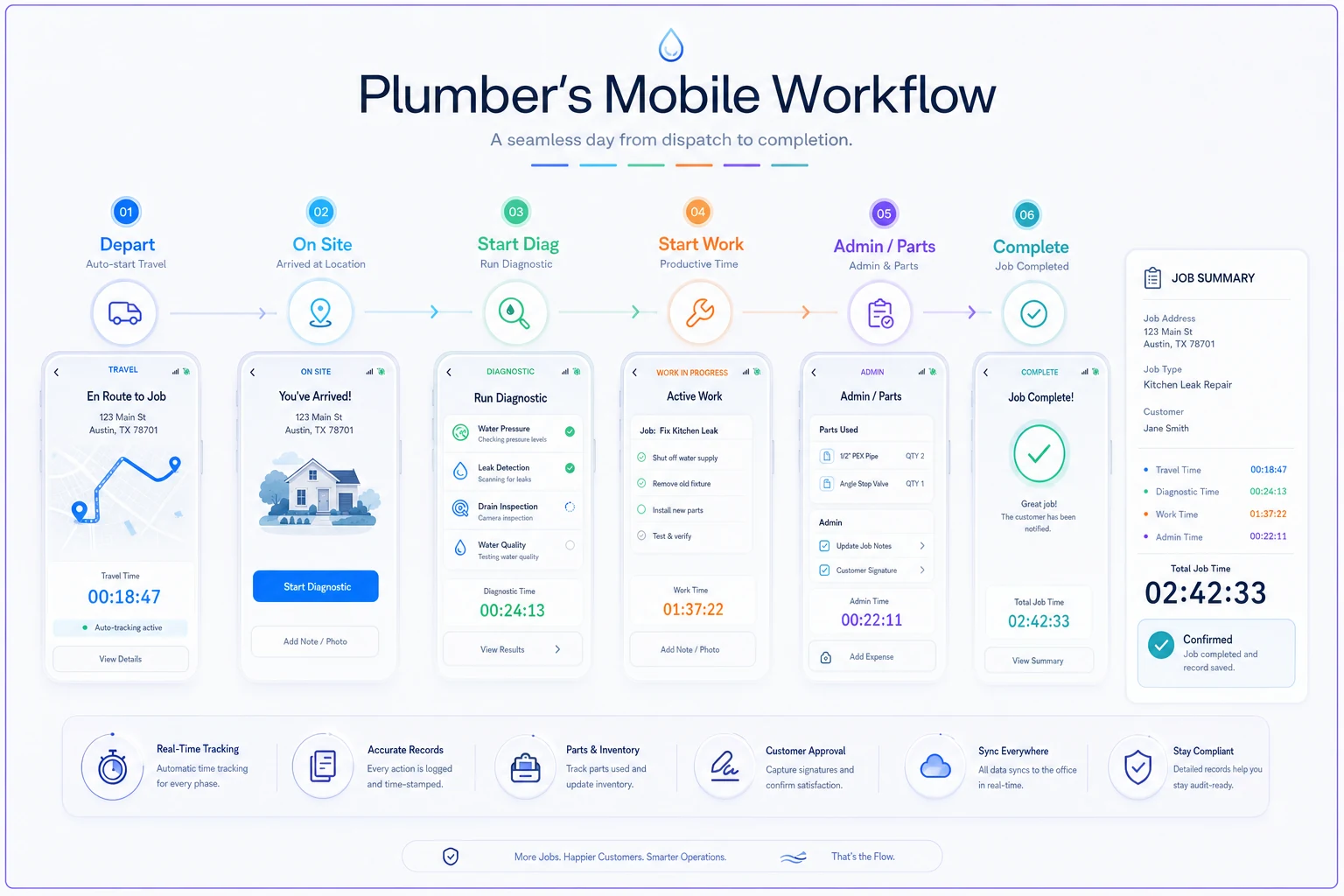
A simple visual of the flow and summary screen helps align designers and techs on the one-tap rules.
Use GPS or route dispatch to auto-start travel so techs don't have to remember the Depart tap.
Correcting time in the field is cheap. Correcting it Friday afternoon from memory is basically fiction.
Exception handling: where the real leakage lives
Clean rules handle maybe 80% of days. The rest is where money quietly leaks, and it's almost always the same handful of situations.
The overlapping-clock problem. Two clocks running at once — a tech "starts work" but forgot to stop travel. If your system allows overlaps silently, you've double-counted labor. The fix is simple: starting one state auto-stops the others. Only one clock runs at a time.
The forgotten stop. Tech finishes at 2:40 but taps Complete at 4:15 because he got pulled into something. Now 95 minutes of nothing is sitting on a job. A good exception rule flags any time state that runs longer than a reasonable threshold — say, productive time over 3 hours on a residential ticket without a note — and routes it for review before it hits payroll.
The zero-diagnostic job. A ticket shows productive time but zero diagnostic. Sometimes legit — a callback, a known scope. Often it means the tech skipped the diag button and that assessment time got swallowed into productive. Flag it, don't auto-trust it.
The phantom travel. Travel logged with near-zero mileage, or travel between two jobs at the same address. Cross-checking logged travel against actual route distance catches padding and honest mistakes both.
The operational principle worth internalizing: exceptions should be caught before payroll runs, not after. Once time flows into a paycheck, correcting it becomes a confrontation instead of a cleanup. The whole point of exception rules is to move the fix upstream of money changing hands.
Auditing the time before it becomes truth
Even with rules and exception flags, you still audit — because the flags catch the obvious, and auditing catches the pattern. You don't audit every ticket. You sample and watch trends.
A weekly time audit that takes around 20 minutes:
-
Pull all tickets where total logged time differs from clock-in-to-clock-out by more than 15 minutes. That gap is unaccounted time — it has to land somewhere.
-
Check the diagnostic-to-productive ratio by tech. A tech whose diagnostics consistently run double the shop average is either thorough, slow, or mis-tagging. All three are worth a conversation.
-
Review idle time by reason. If "waiting on parts" is your top idle reason and it's climbing, that's not a time problem — it's a truck-stock or parts-workflow problem showing up in the labor data.
-
Spot-check three completed tickets per tech against the mobile summary they confirmed. Do the numbers match what got imported?
The insight most owners miss: audit findings usually point away from the time system. Rising idle-wait means a stocking problem. Ballooning admin means your supply-house process is broken. Time data audited properly becomes a diagnostic tool for the whole operation, not just a payroll check.
Reconciliation: making time, payroll, and AR agree
This is the step almost nobody does, and it's the one that actually protects your margin. You have three numbers that should tell the same story and rarely do:
-
Time captured in the field — labor hours by job.
-
Payroll paid — hours the tech got paid for.
-
Labor billed — hours that made it onto invoices and into AR.
They diverge constantly. A tech gets paid for 40 hours. Field capture shows 37 hours attached to jobs. Invoices billed 34 hours of labor. Where did the other 6 go? Some is legitimate non-billable — shop time, meetings, training. Some is leakage — real work that never made it onto an invoice.
A monthly payroll/AR reconciliation check
| Reconciliation check | What it compares | What a mismatch means |
|---|---|---|
| Paid vs. Captured | Payroll hours vs. field-logged hours | Unlogged time, or time on no job |
| Captured vs. Billed | Field productive hours vs. invoiced labor | Work done but never billed (AR leakage) |
| Diagnostic captured vs. Diag fees billed | Diag hours vs. diag charges | Diagnostics given away for free |
| Travel captured vs. travel policy | Logged travel vs. what you intend to recover | Whether your travel policy is real or theoretical |
Run these monthly, per tech. The Captured vs. Billed line is the one that pays for the whole exercise. A shop with three techs quietly losing an hour of billable labor per tech per day is bleeding roughly 15 hours a week — call it $1,500–$2,200 weekly at a loaded billable rate. That's not a rounding error. That's a truck payment.
Once these three numbers reconcile, your labor cost is finally trustworthy enough to feed a real job costing model — and the KPI dashboards built on top of it stop lying to you. Clean time in means the labor-cost-percentage, first-time-fix, and revenue-per-hour metrics you track actually reflect reality instead of guesswork. The operational KPIs that drive real decisions are only as good as the time capture underneath them.
A real scenario
A three-truck residential shop was booking travel into whatever the first job of the day was and lumping diagnostic time in with repair time. Their books said drain and sewer work carried great margins and water heater installs were barely breaking even.
When they split the clock into travel, diagnostic, and productive — then reconciled a month of tickets — the picture flipped. Water heaters weren't unprofitable. They were usually the first call of the day, so they'd been absorbing every morning's travel time. Drain work looked great partly because it was often an afternoon fill-in job with travel already "spent" elsewhere.
Nothing about the actual work changed. Once travel and diagnostics had their own buckets, they found somewhere around 5–7 billable hours a week that were being completed and never invoiced — mostly diagnostic time on jobs that didn't close. Tightening the diagnostic-to-quote handoff recovered a meaningful chunk of that. Within two months, their labor cost percentage moved a few points in the right direction, and for the first time the number they used to price jobs matched what was actually happening in the field.
When this level of rigor makes sense — and when it doesn't
When it's worth it: the moment you have more than one tech, or you're using job cost to set prices. Once labor data drives a pricing decision, sloppy capture directly costs you money on every future job.
When it's overkill: a true owner-operator solo shop billing flat-rate off a fixed menu, where you already know your day cold. Five time states for one person is process for its own sake. Track travel and diagnostics separately if you want the visibility — skip the reconciliation machinery until you hire.
Who should not bolt this on as-is: shops with no job codes on their tickets yet. Time capture rules assume every productive minute can attach to a job. If your tickets don't carry clean job identifiers, fix that first. Otherwise you're building precise measurement on top of an unlabeled foundation.
The takeaway that actually matters
The point of all this isn't tidier timesheets. Every downstream number you rely on — margin, revenue per hour, which services to push, whether your diagnostic fee is real — inherits the quality of your field time capture. Blob time in, blob decisions out.
Get the five states, the one-tap rules, and the three-way reconciliation working, and your labor data stops being a source of arguments and starts being something you can actually run the business on. Travel finally has a home, diagnostics stop hiding inside repairs, and the number you price from is the number that's really happening on the trucks.
Get the five states, the one-tap rules, and the three-way reconciliation working, and your labor data stops being a source of arguments and starts being something you can actually run the business on. Travel finally has a home, diagnostics stop hiding inside repairs, and the number you price from is the number that's really happening on the trucks.
Ready to optimize your plumbing operations?
Join 500+ plumbing businesses using Plummerly to save time, reduce scheduling errors, and improve customer satisfaction.