


Most plumbing owners don't set out to build a fragmented tech stack. It happens quietly. You buy a scheduling tool because dispatch is a mess. Then a separate invoicing app because the first one couldn't handle your pricing. Then a parts-tracking spreadsheet because neither tool understood your truck inventory. Two years later, job data lives in one place, invoices in another, and parts counts are in a shared drive that only your office manager fully understands.
That's fragmentation. And it matters not for philosophical reasons — it quietly caps how big you can get. A one-truck operation can survive on disconnected systems held together by memory and text messages. A four-truck operation can't. The seams start showing up as billing errors, parts you thought you had, jobs invoiced twice or not at all.
This article is about evaluating technology integration for a plumbing business the way it actually breaks in the real world — by maturity stage, by the data that has to move between systems, and by the contract terms that determine whether a vendor helps you or traps you. Less about which app is "best" and more about how the pieces connect, what has to survive as you scale, and what to demand before signing anything.
Why Integration Breaks Differently at Each Stage
A mistake that shows up constantly: owners evaluate software as if their business will always look the way it does today. They pick tools for the problem in front of them, not the workflow they'll need in eighteen months.
Integration needs change dramatically with size. What works with one truck actively fails at three.
One to two trucks. At this stage, the owner is usually the integration layer. You know every job, you touch every invoice, you personally remember whether the water heater got billed. Disconnected tools are annoying but not fatal, because a human brain is doing the reconciliation. The danger isn't the fragmentation itself — it's picking tools that can't connect later, forcing you to rip everything out when you grow.
Three to five trucks. This is where fragmentation starts costing real money. The owner can no longer personally verify every job-to-invoice handoff. Job data needs to flow automatically into invoicing, and parts usage needs to update inventory without someone re-keying it. When these don't connect, you get leakage: unbilled work, wrong parts charges, jobs marked complete that never got invoiced. Shops at this size can lose the equivalent of a truck's monthly revenue to billing gaps they can't even see.
Six-plus trucks. Now integration isn't a convenience — it's the operating system. Dispatch, field data, parts, invoicing, and reporting all have to share a single source of truth or your numbers stop meaning anything. At this scale, a broken data handoff between two systems doesn't cause a small error; it corrupts your reporting for the entire month.
If you want the broader framing on how tooling decisions map to headcount and growth stages, the maturity roadmap for scaling plumbing operations lays out the stage-by-stage logic this article builds on.
The Three Data Contracts That Actually Matter
Forget "integration" as a vague concept. In a plumbing stack, integration is really three specific streams of data moving cleanly between systems. If these three move reliably, most fragmentation problems disappear. If any one breaks, the whole chain becomes unreliable.
Stop missing service calls and double bookings.
Plummerly helps you schedule, assign, and manage every plumbing job efficiently.
- Centralized job scheduling
- Technician dispatch & tracking
- Customer notifications
No credit card required
A data contract is simply an agreement — written or technical — about exactly what fields move, in what format, and when. Most vendor 'integrations' are vague on purpose. Your job is to make them specific.
Jobs
The job record is the spine. Everything downstream depends on it being complete and consistent.
At minimum, a job record flowing between systems needs:
-
A unique job ID that never changes and isn't reused
-
Customer identity (linked to a customer record, not just a name typed in a field)
-
Service address (separate from billing address — plumbers get this wrong constantly)
-
Job status with defined values (scheduled, en route, in progress, complete, needs follow-up)
-
Assigned technician
-
Timestamps for created, dispatched, arrived, and completed
-
A link to the originating call or request
The pattern that breaks things: two systems using different status labels. Your scheduling tool says "done," your invoicing tool expects "ready to bill," and nothing triggers because nobody mapped those two words to each other. That single mismatch sits behind a huge share of "we forgot to invoice that job" problems.
Parts
Parts data is where most plumbing integrations quietly fall apart, because parts live in three places simultaneously: the truck, the job, and the invoice.
A clean parts contract needs each part tied to:
-
A stable SKU or part number (not free-text descriptions — "1/2 copper elbow" typed four different ways is four different parts to a computer)
-
Quantity used on the specific job
-
The cost basis at time of use
-
The truck or location it came from
The reason this matters: parts data feeds two different systems that people forget are connected. It feeds invoicing (so the customer gets charged correctly) and inventory (so the truck gets restocked). When these aren't linked by a real contract, you get the classic failure — a tech uses a $180 part, it makes it onto the invoice but never gets decremented from truck stock, and three weeks later he's out of a part he "should" have had. The par-level system you built collapses because the data feeding it is wrong.
Invoices
The invoice is where job and parts data converge, and it's where errors become customer-facing and legally binding.
The invoice contract should pull, not re-enter:
-
Line items derived from the job's labor and parts used
-
Pricing sourced from your actual price book, not typed by hand
-
Tax handled by rule, not memory
-
A link back to the job ID so any invoice can be traced to its source
-
Payment status that flows back to reporting
Here's a simple way to think about how these three contracts connect:
| Data Contract | Feeds Into | Breaks When... | Real Cost of Breaking |
|---|---|---|---|
| Jobs | Invoicing, reporting, dispatch | Status labels don't match between systems | Jobs never get billed |
| Parts | Invoicing AND inventory | Free-text descriptions instead of SKUs | Wrong charges + phantom stock |
| Invoices | Reporting, A/R, accounting | Data re-keyed by hand instead of pulled | Billing errors, slow A/R, disputes |
The failure mode is re-keying. Every time someone retypes a job into an invoice, you introduce error and delay. The whole point of a data contract on invoicing is that the invoice assembles itself from data that already exists.
A Real Scenario: Where the Money Leaks
Consider a four-truck residential shop doing roughly 320–360 jobs a month. They ran a well-known scheduling tool and a separate accounting package — on paper, "integrated." In reality, the connection only pushed a customer name and a total dollar amount. No line items, no parts detail, no job ID linkage.
What that meant in practice: every invoice got rebuilt by hand in the office. The office manager read the tech's notes, looked up prices, typed line items. On a good day that worked. On a busy week, jobs slipped. When they audited a full month, they found somewhere around eleven completed jobs that had never been invoiced — roughly $4,000–$5,000 in work simply gone. Add a steady drip of parts charged wrong because descriptions were typed from memory.
The fix wasn't a fancier tool. It was insisting on a real data contract: job IDs flowing through, parts moving as SKUs, invoices assembling from job data instead of getting rebuilt from scratch. Once they tightened the handoff, the "forgot to invoice" problem essentially disappeared, and A/R got noticeably cleaner because invoices went out same-day. The tooling was capable of this the whole time — nobody had ever specified what data actually had to move.
That gap between "these two systems are connected" and "these two systems move the right data reliably" is where almost all fragmentation pain lives.
Vendor Contract Clauses You Actually Need
This is the part owners skip, and it's the part that decides whether a vendor is a partner or a hostage situation. The sales demo tells you almost nothing about what happens when things go wrong. The contract does.
Push for these before signing:
-
Data export rights, in a usable format. You must be able to get all your data out — jobs, customers, invoices, parts history — in a standard format (CSV or via API), on demand, without paying a ransom or waiting weeks. If a vendor is cagey about export, that's your answer.
-
API access at your tier. Many vendors gate integration behind expensive plans. Know before signing whether the integration you need is available at the price you'll actually pay.
-
Uptime SLA with real numbers. A meaningful SLA states an uptime percentage and what you get if they miss it. "We try hard" is not an SLA. For a shop that runs dispatch through the tool, downtime during business hours means lost jobs.
-
Support response commitments. Defined response times for critical issues, not just a help-desk email address. When invoicing goes down on a Friday, "we'll respond within 2 business days" is useless.
-
Data ownership language. The contract should plainly state that your business data is yours. Some agreements are murky here, especially around customer lists.
-
Change and deprecation notice. Vendors change or kill features. Get written notice requirements before an integration you depend on gets removed or altered.
-
Price-increase caps or notice periods. Sudden pricing jumps on software you're now dependent on is a real risk. Get notice terms in writing.
The clause people regret skipping most is data export. When a shop outgrows a tool or the vendor gets acquired and the product degrades, the ones who negotiated export rights migrate in a weekend. The ones who didn't spend months — and real money — extracting their own history, or just give up and lose it.
The Implementation Checklist for a Plumbing Stack
Once you've picked tools and pinned down contracts, the rollout is where integrations succeed or quietly fail. Order matters.
-
Map your current data first. Before connecting anything, write down where jobs, parts, and invoices currently live and how they move today — even if the answer is "in the owner's head." You can't integrate a workflow you haven't documented.
-
Standardize your part numbers. This is the unglamorous step everyone wants to skip. If your parts are free-text, fix that before integrating anything. A clean SKU list is the foundation of clean parts data.
-
Define your job status values. Agree on the exact status labels every system will use and make sure they map to each other. This one decision prevents most "jobs that never got billed" failures.
-
Connect jobs to invoicing first. This is your highest-value link and stops revenue leakage fastest. Get this solid before touching anything else.
-
Connect parts to both invoicing and inventory. Only after job-to-invoice is stable. Verify that a used part shows up on the invoice and decrements truck stock.
-
Test with real jobs, not demo data. Run ten actual jobs through the full chain — dispatch to invoice — and audit every field. Demo data hides the messy edge cases that break real integrations.
-
Set up reporting last. Once data flows cleanly, connect your dashboards. Reporting built on broken data just gives you confident wrong answers.
A quick visual of the recommended rollout order:
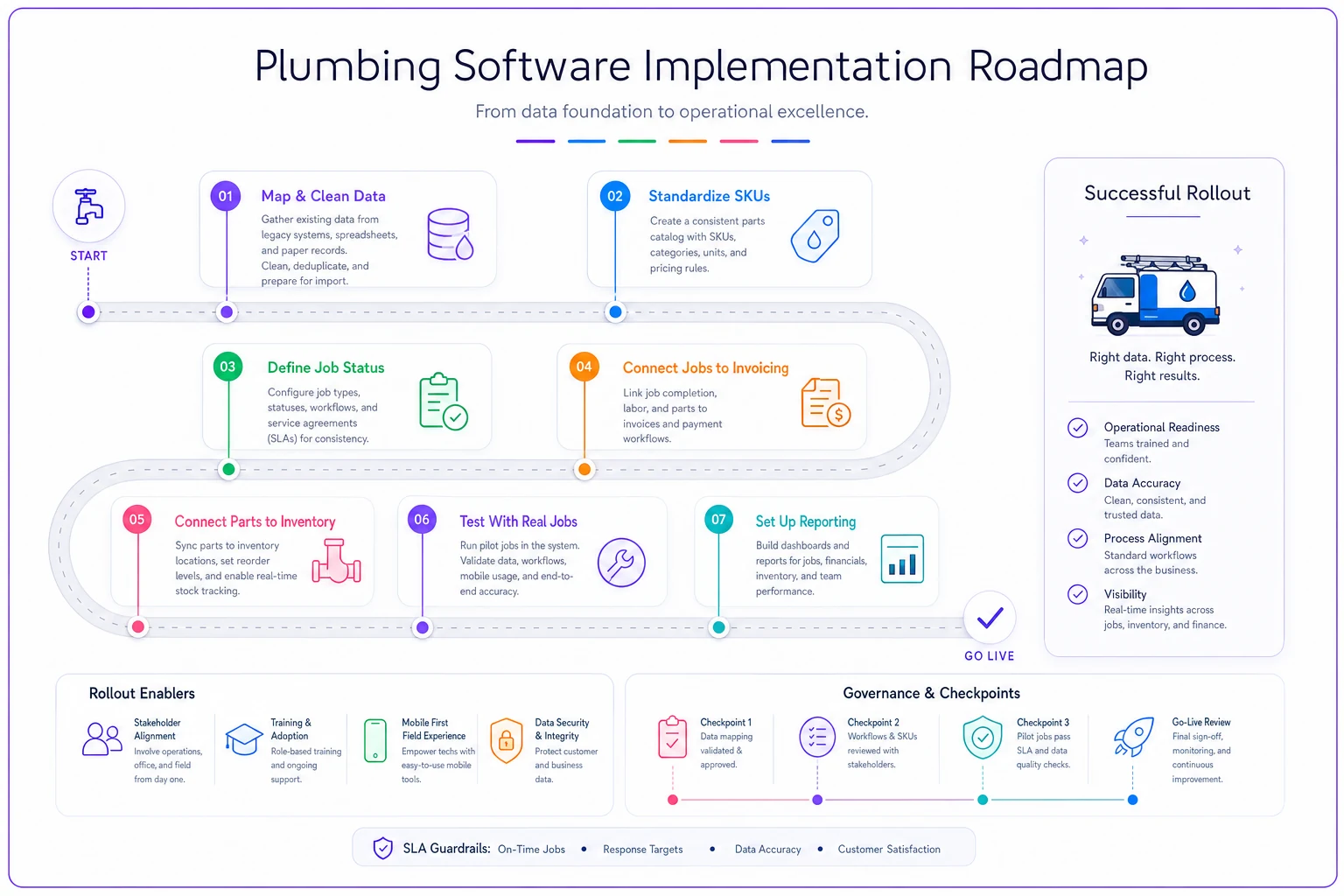
Run your ten-job test during a busy week to surface the edge cases demo data hides.
If your underlying processes aren't documented, integration will just automate your chaos faster. The copyable operations SOP template is worth working through before you wire systems together — clean processes make clean integrations, and messy ones don't fix themselves in software.
When Deep Integration Is a Bad Idea
Not every shop should be chasing a fully connected stack.
When it makes sense: you're at three-plus trucks, you're re-keying data between systems, and you can point to specific leakage — unbilled jobs, wrong parts charges, slow A/R. At that point, integration pays for itself quickly.
When it's premature: you're a solo operator or two trucks and the owner still touches every job. Building complex integrations here solves a problem you don't have yet. Pick tools that can connect later, but don't over-engineer now.
Who should genuinely wait: if your parts aren't standardized and your processes aren't documented, integrating first will lock your chaos into place. Fix the foundation, then connect. Automating a broken workflow just produces broken results at higher speed.
There's also a middle path people forget. You don't need everything integrated. The job-to-invoice link is worth almost any effort. Parts-to-inventory is worth it at scale. But some connections — syncing every marketing touch into your dispatch system, for example — add complexity for little operational return at a small size. Integrate the streams that leak money, and leave the rest loosely coupled until they earn the effort.
What "Good" Looks Like When It Works
When the data contracts hold and the integration is real, the whole operation feels different. A tech closes a job on his tablet. The parts he used decrement from his truck automatically and land on the invoice at the right price. The invoice assembles itself and goes out the same day. The job flows into reporting so you can actually see, by week, which job types and which techs are profitable.
Nobody re-keys anything. Nothing gets forgotten. Your numbers mean what they say. That last part is underrated — clean integration is what makes your KPIs trustworthy in the first place. If you're trying to run the ops and technician metrics that actually drive decisions, every one of those numbers is only as reliable as the data contracts feeding it. A beautiful dashboard built on fragmented data is just a well-designed way to be confidently wrong.
Fragmentation isn't a tooling problem you buy your way out of with one perfect app. It's a design problem — deciding deliberately what data has to move between systems, holding vendors to real contract terms so you're never trapped, and rolling it out in an order that protects revenue first. Get those three things right and you can grow past the size where most plumbing shops start choking on their own operations. Get them wrong and you'll spend your growth years re-keying invoices and hunting for jobs that fell through the cracks between tools that were supposed to be connected.
Ready to optimize your plumbing operations?
Join 500+ plumbing businesses using Plummerly to save time, reduce scheduling errors, and improve customer satisfaction.